
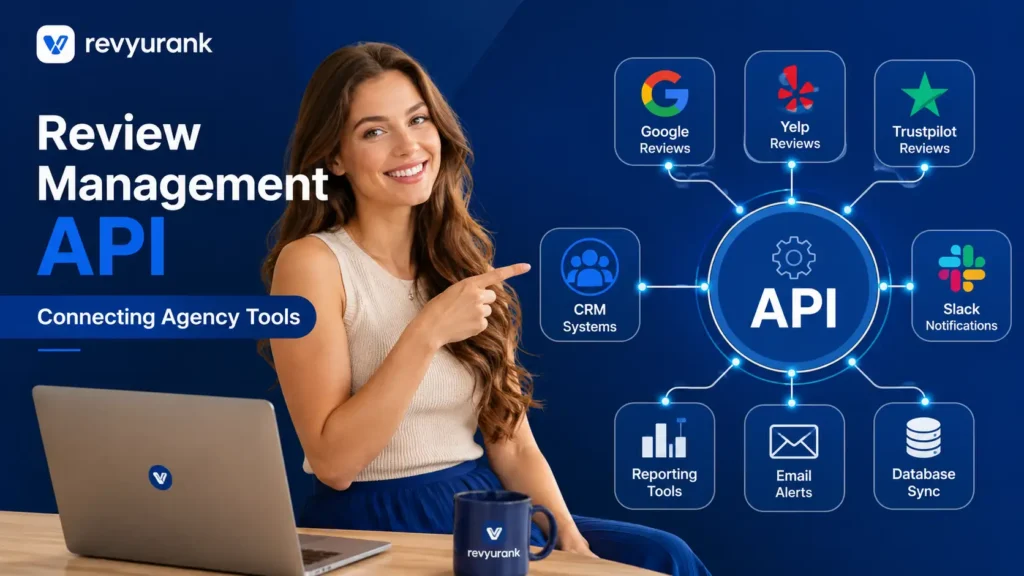
A review management API helps agencies connect customer review data, monitoring, responses, analytics, and reputation workflows with the tools they already use. Instead of manually checking multiple review platforms and client dashboards, agencies can use APIs to centralize review activity, automate routine tasks, and move review data between CRMs, reporting systems, customer support tools, and internal workflows.
In 2026, a review management API can make agency operations more scalable by helping teams collect review data in one place, track new feedback, identify urgent issues, manage responses, and create automated client reports. API integrations can also support multi-location and multi-client management, allowing agencies to build customized workflows around their own technology stack.
The biggest advantage is flexibility. While standard review management software provides fixed features, an API allows agencies to connect review data with existing systems and create workflows that match their services. This can reduce repetitive manual work, improve response times, provide clearer reputation insights, and help agencies demonstrate measurable value to clients.

Understanding Review Management APIs in Agency Workflows
A review management API gives agencies a way to plug online review management into the systems they already run. Instead of jumping between separate tools, your team can connect review requests, review responses, alerts, and reporting with CRM, support, and project management workflows.
That matters in digital marketing because speed and consistency shape results. A strong review management strategy depends on fresh reviews, timely follow-up, and clear visibility across accounts. When review data moves automatically, agency workflows become more reliable, and teams spend less time on repetitive work.
What Makes an API Different From Off-the-Shelf Tools
Off-the-shelf review management software is built for quick setup and ease of use. You log in, use the dashboard, and handle the review process inside the platform. That works well for simple needs, especially when one business or one team manages everything in one place.
An API changes the model. Instead of forcing your agency into a fixed review management system, good API design lets review actions move into tools you already rely on. Review requests can start from CRM activity, alerts can go to Slack, and reporting can flow into your existing analytics setup.
So the real difference is flexibility. A dashboard shows information, but an API helps your systems act on it. For agencies handling many clients, locations, and service teams, that means fewer manual steps, tighter control, and a setup that fits how your business already operates.
Why Agencies Need API Access Beyond Just Dashboards
A single dashboard is useful, but it is rarely enough for an agency managing many accounts. Teams still need to move review data into project management tools, notify account leads, build client reports, and route customer concerns to the right people. Without API access, that often becomes manual work.
Workflow automation changes that. Agencies can trigger review requests after a completed job, send new online reviews into internal channels, and connect location-level feedback with tasks or escalations. This keeps work moving without constant copying, checking, and reformatting.
There is also a scale issue. As review volume grows, dashboard-only setups can slow response times and create gaps across teams. API access helps agencies automate routine tasks, reduce missed feedback, and create a more connected system for reputation handling, client service, and reporting.
Essential Agency Use Cases for Review Management APIs
In real agency work, a review management API is most useful when it supports repeatable tasks across many accounts. Marketing agencies often need to send a review request after a service event, capture customer feedback, and keep every location or client account organized.
Automation makes those steps easier to scale. Instead of treating reviews as a separate job, agencies can build them into everyday operations. The most practical use cases usually center on CRM triggers, white-label dashboards, account-level visibility, and systems that support many clients without extra manual effort.
Automating Review Requests With CRM Triggers
One of the clearest use cases is tying a review request to CRM triggers. When a sale closes, an appointment ends, or a service ticket is marked complete, the API can start review collection automatically. That helps agencies create a steady flow of fresh reviews without asking teams to remember each step.
This kind of workflow automation also improves timing. Requests go out when the customer experience is still recent, which can lift response rates and bring in more useful customer feedback. It also supports consistency across local businesses and multi-location clients.
Common tasks that can be automated include:
- Sending a review request by email or text after a CRM status change
- Applying location or client-specific templates during review collection
- Tracking which triggers produce the strongest volume of fresh reviews
For agencies, that means less manual chasing and a more dependable review process across accounts.
Multi-Client Dashboards and White-Label Solutions
Agencies rarely manage one brand at a time. They need a multi-client dashboard that gives a clean view across accounts while still keeping each client’s data separate. A review management platform with API support helps agencies pull account data into their own interface instead of forcing every user into the same vendor dashboard.
That opens the door to white-label delivery. Your agency can present review metrics, alerts, and performance summaries under your own brand while still using the platform in the background. This creates a smoother client experience and makes project management easier for internal teams.
Useful multi-client features often include:
- Account-level permissions for staff, local teams, and clients
- White-label reporting views tied to each business location
- Filters for customer satisfaction, response status, and review volume
These features help agencies stay organized as their client list grows.

Efficient Review Handling With Webhooks and Alerts
Fast action matters in online review management. When new feedback comes in, agencies need review alerts that reach the right person right away. Webhook notifications make that possible by pushing events out as they happen instead of waiting for someone to check a dashboard.
That speed is especially important for negative reviews and urgent customer concerns. With workflow automation, agencies can route issues, notify teams, and start follow-up quickly. The result is a more efficient way to protect brand trust and keep service problems from spreading across accounts.

Setting Up Webhook-Based Notifications
A webhook sends data the moment a specific event happens. In the review process, that event might be a new review, a rating drop, or a response that needs approval. Instead of pulling data manually, the system pushes a notification to the agency’s chosen tool right away.
This makes daily handling much smoother. Teams can send review responses faster, flag customer issues earlier, and keep account managers informed without extra checking. It also supports stronger customer relationships because no one has to wait for a manual update before taking action.
Agencies often use webhook notifications to:
- Send a Slack or task alert when a new review is posted
- Trigger internal approval steps for review responses
- Notify account teams when priority feedback appears
That kind of real-time setup reduces lag and keeps work moving.
Routing Negative Reviews for Fast Resolution
Negative reviews need a different path than standard feedback. If an unhappy customer raises serious concerns, the agency should not rely on someone noticing it later in a shared inbox. API-based routing helps send those issues to the right team as soon as they appear.
That improves response quality and supports better customer service. A fast handoff can move a complaint from public review to internal follow-up before the issue grows. It also protects business reputation by making sure urgent feedback is handled with the right context and accountability.
A strong routing setup usually includes:
- Rules based on star rating, sentiment, or keywords
- Escalation to support, operations, or local teams
- Tracking steps so customer concerns are not lost
For agencies, this creates a practical way to manage risk across many client accounts.
Streamlining Data With Bulk Reporting and Analytics
Reporting is where API access often saves agencies the most time. Instead of exporting files from each account, teams can pull review data across clients into one reporting flow. That makes bulk reporting easier and gives agencies a cleaner view of review metrics at scale.
Just as important, connected analytics turn raw feedback into valuable insights. Agencies can compare locations, track response activity, and spot patterns that affect customer satisfaction or local visibility. Those findings help show clients the operational and marketing value behind effective review management.
Cross-Account Review Insights for Agencies
When agencies manage several brands or many locations, cross-account reporting becomes essential. Pulling review data into one system helps teams compare performance without switching between separate dashboards. That creates faster access to review insights and makes it easier to identify patterns that deserve attention.
The value is not just convenience. Agencies can use review metrics to spot weak locations, rising complaints, or accounts with strong momentum. These actionable insights help account managers guide strategy, support local teams, and explain results in a way clients can understand.
| Reporting Area | What Agencies Can See | Why It Matters |
| Review volume | Total reviews by client, location, or time period | Shows growth and campaign impact |
| Response activity | Response rate and handling speed | Reflects service discipline and follow-up |
| Rating trends | Changes in average score over time | Highlights reputation movement |
| Issue patterns | Repeated complaints or praise themes | Supports action beyond reporting |
This kind of visibility helps agencies move from basic summaries to smarter recommendations.
Measuring Performance and ROI for Clients
Clients want more than a list of reviews. They want to understand performance and whether the process is helping the business. An API makes that easier by connecting client reviews to reporting systems that show progress over time. Agencies can then turn review activity into a clearer business story.
ROI usually comes from efficiency, stronger visibility, and better handling of customer issues. The compiled guidance shows that review volume, freshness, ratings, and response rates influence local SEO and trust. Those signals can shape conversions and support smarter business decisions.
Agencies can measure ROI through:
- Growth in review volume and response consistency
- Faster handling of customer concerns across locations
- Trends in customer satisfaction and rating improvement
When reporting connects these outcomes to agency work, clients can see the value more clearly.
Top Features Agencies Should Look For in a Review Management API
Not every review management API will support agency needs equally well. The best options combine integration flexibility with ease of use, so teams can build workflows without creating extra complexity. That balance matters when the same system must serve account managers, analysts, and clients.
Multi-client support should be near the top of the list. Agencies need review management software that can scale across locations, keep account data organized, and fit into existing tools. From there, strong integrations and reliable permissions become key parts of the selection process.
Supporting Multiple Client Accounts Seamlessly
A review management platform for agencies must handle multi-client accounts without turning daily work into a mess. If your team supports local businesses, franchises, or large groups of locations, the system should keep each account structured while still giving leadership a broad view.
Ease of use still matters here. Agencies need filters, permissions, and account-level controls that reduce confusion as review volume rises. A platform that works well for one brand may break down quickly when many teams, clients, and locations need access at once.
Look for features such as:
- Clear separation of client data with role-based access
- Location-level views for brands with many local businesses
- Scalable reporting for rising review volume across accounts
These features help agencies stay accurate, efficient, and consistent as they grow.
Integration Capabilities With CRM, Zapier, Slack, and More
Strong integrations are what make a review management system truly useful inside an agency. The compiled material highlights that review platforms should connect with CRM, support tools, and broader enterprise systems so review data does not stay isolated. That same principle applies to agencies of all sizes.
In practice, this means your review workflow can extend into Zapier, Slack, and project or ticketing tools. CRM activity can trigger requests. Slack can receive alerts. Reporting systems can absorb review data automatically. This kind of workflow automation reduces manual work and keeps teams aligned.
Helpful integration options include:
- CRM connections for automated review requests
- Zapier for linking reviews with no-code agency workflows
- Slack alerts for new reviews, escalations, or approvals
The more naturally the API fits your stack, the easier it is to use at scale.
Best Practices and Common Pitfalls When Integrating APIs
API integration works best when it supports a clear review management strategy, not just a technical launch. Agencies should define what needs to happen with online reviews, who owns each step, and how success will be measured before they start building workflows.
Project management is just as important as the technology. Without clear ownership, agencies may create automations that confuse teams or miss key alerts. Good setup starts with focused use cases, practical routing rules, and a review management API that matches how the agency already operates.
REST APIs vs Webhooks—What Agencies Actually Use
A REST API and a webhook do different jobs, and most agencies end up using both. A REST API is useful when your team wants to request data, build reports, or sync account information on demand. A webhook is better when you need instant updates from the review management platform.
That difference matters for review strategy. If you want scheduled reporting, account syncing, or dashboard creation, use the REST API. If you want fast alerts for new feedback or urgent rating drops, use a webhook. Together, they help agencies improve response quality and reduce delays.
A practical setup often looks like this:
- REST API for pulling review data into reports or dashboards
- Webhook for real-time alerts and escalations
- Shared rules so both tools support the same review strategy
The best practice is not choosing one. It is using each for the job it handles best.
Build vs Buy—Selecting the Right API Solution for Your Needs
The build vs buy choice depends on how much control your agency needs and how much complexity you can manage. Building gives more customization, but it also creates ongoing work around maintenance, reliability, and user experience. Buying review management software with solid API access can speed up delivery.
Many agencies make mistakes when they underestimate the operational side. They focus on the connection itself, then realize later that permissions, templates, routing, and reporting still need structure. Ease of use matters because a powerful api solution still fails if teams do not adopt it.
When weighing build vs buy, consider:
- Whether your team can maintain custom integrations long term
- How quickly you need launch-ready review management software
- Whether the vendor supports the workflows your agency already uses
For many agencies, buying a flexible platform is the faster and safer path.
Conclusion
In conclusion, understanding how a Review Management API can seamlessly fit into agency workflows is crucial for enhancing client satisfaction and operational efficiency. By leveraging the unique capabilities of APIs, agencies can automate review requests, manage multiple clients effectively, and respond swiftly to negative feedback.
This not only streamlines processes but also provides valuable insights through bulk reporting and analytics. As you embark on integrating these tools, remember to prioritize features that support your specific needs for maximum impact. If you’re ready to elevate your agency’s review management practices, get a free consultation to explore the best solutions tailored for you.