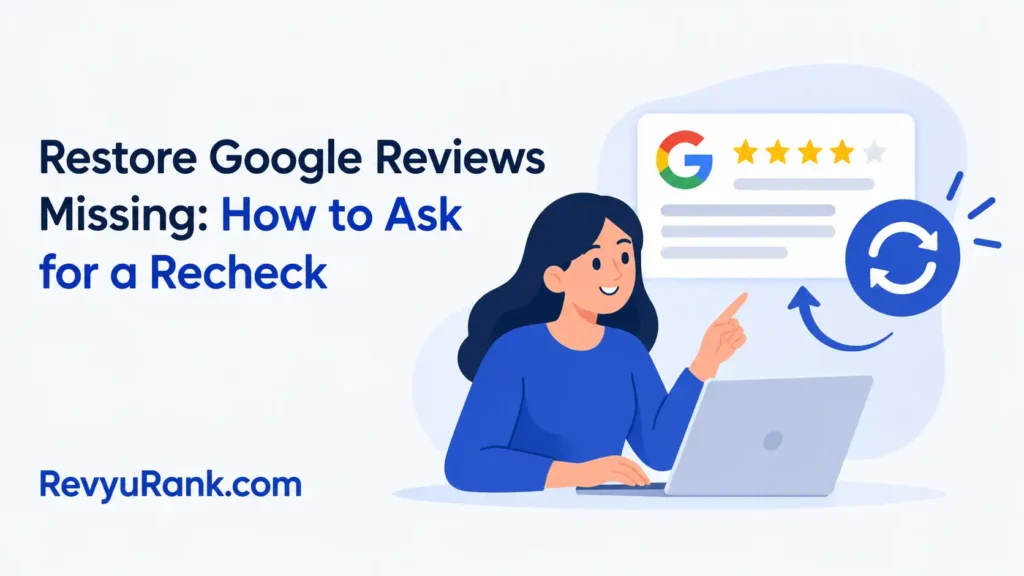
You can’t restore missing reviews on your profile yourself. When they vanish because a filter removed them or the reviewer deleted them, you can ask Google to look again through your Business Profile dashboard; if they broke a rule, they won’t come back, and this guide covers why they disappear, how to ask for a recheck, what numbers matter, and when you’ll need to move on.
Why your Google reviews go missing
A missing review isn’t always lost forever. Sometimes it’s just hidden by an automated system that checks every post before it stays public. That system looks for spam, fake accounts, or content that breaks the rules.
When the filter flags something, the review drops off your total count and your star rating shifts. You don’t get an alert when this happens. You only notice the number going down.
The biggest misconception is that reviews are permanently erased the moment they disappear. In reality, most flagged reviews sit in a holding state. They’re hidden from the public but still exist on Google’s servers while the automated check runs its course.
If the system finds nothing wrong, the review comes back on its own. That usually takes three to five days. If the review actually broke a policy, it stays gone.
Reviews often vanish because the text contains a phone number or a web address. The filter treats those details as attempts to redirect traffic away from the platform. Removing that single link from the text is usually enough to clear the flag.
A sudden burst of five-star ratings will also trigger a hold. If ten people review you on the same day after months of silence, the algorithm assumes coordination. It hides the newest entries until it confirms the reviewers visited your physical location.
Business owners frequently make things worse by asking the reviewer to delete and rewrite the post immediately. Doing that resets the entire waiting period. Let the original submission finish its review cycle first.
How to request a review recheck
You’ll do this entirely inside your Business Profile. Don’t email general support; they route everything back to the same dashboard anyway.
- Sign in to the Google account that manages your Business Profile.
- Search your exact business name in the search bar to open your profile on Search.
- Click the “Reviews” tab near the top of your management menu.
- Look for the “Missing reviews” section or the help icon if your total count dropped recently.
- Click “Contact us” or “Request a review” at the bottom of the support panel.
- Fill out the form with your business name, the date you noticed the drop, and how many reviews vanished.
- Submit the ticket and wait 3 to 5 business days for the initial response.
The single judgment call here is knowing which reviews to mention. If you lost ten reviews, list the ones left by real customers who spent money. Don’t waste the form asking about obvious spam.
If a customer posted from a brand-new account with no history, leave it out of your request. Focus your effort on the genuine feedback that actually matters to your rating. Including spam in your appeal slows down the whole process.
If the form asks for proof, attach a receipt or order number matching the reviewer’s name. That speeds things up. Without proof, you’re relying purely on the algorithm’s second guess.
Review recovery settings and timelines
These figures assume you submitted a standard request through the Business Profile dashboard. Timelines shift based on how many reviews you lost and why they disappeared.
| Situation | What to use | How long | What to watch for |
|---|---|---|---|
| Sudden drop of 1-3 reviews | Support form in dashboard | 3-5 business days | Check if the reviewer deleted their own account first |
| Mass removal (10+ reviews) | Escalation via support form | 7-14 business days | Watch for temporary profile suspension during investigation |
| Review stuck in pending status | Do nothing, wait it out | Up to 7 days | Rating might fluctuate daily until the filter finishes |
| Removed for conflict of interest | Can’t be recovered | Permanent | Staff reviewing their own workplace triggers this instantly |
| Lost after a business merge | Re-verification of new profile | 14-30 days | Old reviews sometimes don’t transfer to the merged listing |
| Disappears right after editing reply | Refresh cache, wait 24 hours | 1-2 days | A bug in the edit function occasionally hides the thread |
Your actual wait time depends on the queue volume at the support center and the complexity of your specific case. You can check your ticket status directly in the support hub of your dashboard.
Don’t submit multiple tickets for the same problem. That pushes you to the back of the line every single time. Pick the row above that matches your situation and follow that timeline.
Getting better results from support
Preparation changes the outcome here. When you file a request without details, it gets treated as a low-priority automated sweep. When you provide specifics, a human is more likely to review the flag.
Before you click submit, write down the names of the reviewers who disappeared. Note the dates they originally posted. If you have screenshots showing the review was live yesterday, attach them.
The order you work in matters too. First, verify your business profile is fully active. An unverified profile won’t get support attention. Second, check if the reviewer’s account still exists by searching their name. Third, file the ticket.
Halfway through the waiting period, check your spam folder. Support replies often land there instead of your main inbox. Missing that email means your ticket closes automatically after a few days of silence.
Leave the star rating alone while you wait. Don’t run a campaign asking current customers to flood your profile with new five-star posts to cover the gap. The algorithm sees sudden spikes as manipulation, and it could trigger a wider penalty on your listing.
The trade-off is patience versus panic. Pushing too hard for a fast answer usually resets your place in the queue. Let the 3-to-5-day window finish before you follow up.
Fixing common review display issues
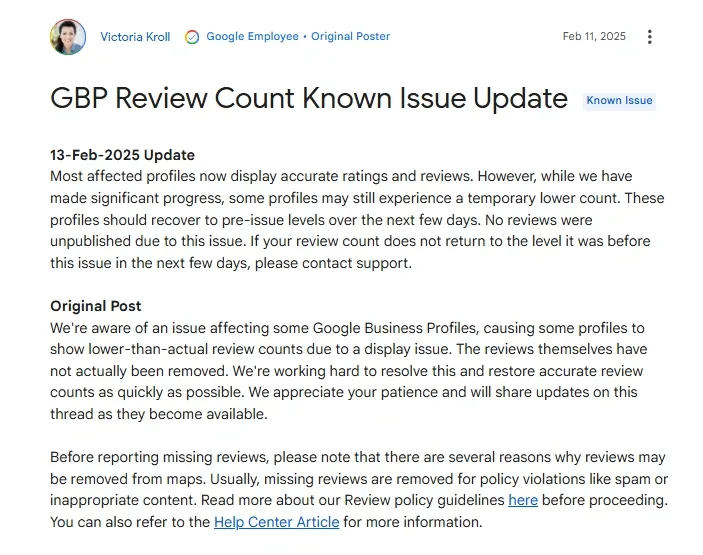
Not every missing review requires a formal support ticket. Some problems stem from local browser data or simple display errors on your end.
Check these basic fixes before you spend time filling out forms. Clearing your cache or switching devices solves a surprising number of visibility glitches.
| What you notice | What it usually means | What to do first |
|---|---|---|
| Reviews show on mobile but not desktop | Browser cache is outdated | Hard refresh your desktop browser using Ctrl+F5 |
| Total count dropped, but stars stayed the same | Filtered reviews were mostly low-rated | Wait 3 days for the system to finalize the count |
| One specific review is gone | Reviewer deleted it themselves | Ask the customer directly if they removed their post |
| All reviews disappeared temporarily | Profile is under manual review | Check your email for any violation notices from support |
| Reviews visible to you but not customers | Restricted view due to policy flag | Log out and search your business as a public user |
If you log out and still can’t see the reviews, the issue is on the server side. That’s when you actually need to use the support form.
Don’t assume a glitch means permanent loss. The display layer and the database layer operate separately. Your reviews might be perfectly safe in the database while the display simply fails to load them.
Rules governing review visibility
The guidelines enforced by the platform dictate exactly what stays up and what gets pulled down. These aren’t suggestions; they’re hardcoded filters applied to every listing globally.
Content containing phone numbers, URLs, or promotional links gets stripped immediately. The automated systems scan for these patterns before a review even goes live.
A common mistake is including an email address in a customer service reply that triggers this same filter. That single line deletes your entire response from public view.
Reviews posted by competitors or former employees violate the conflict of interest policy. If the system links a reviewer’s digital footprint to your payroll or a rival business, the text vanishes.
This detection relies on shared IP addresses, linked payment methods, or overlapping account histories. It catches staff who write reviews from the office Wi-Fi network.
There’s also a strict rule against incentivized feedback. Offering discounts or free items in exchange for a five-star rating puts your entire profile at risk.
The Federal Trade Commission enforces truth-in-advertising laws that apply to online endorsements. Fake or paid reviews carry legal weight beyond just platform penalties.
If your business faces a legal dispute over manipulated ratings, you’ll need a lawyer who handles digital commerce. Platform support won’t intervene in legal matters or reverse removals tied to regulatory action.
Age restrictions apply too. Reviews from accounts belonging to minors may be filtered out depending on regional privacy laws. You can’t override these legal boundaries through a support ticket.
Maintaining your profile after recovery
Once your reviews return, or once you accept the ones that won’t, your job shifts to protection. You need to keep the profile healthy so the filter doesn’t strike again.
Reply to your existing reviews regularly. A profile with active owner responses signals legitimate engagement to the algorithm. Don’t copy and paste the same generic thank-you message everywhere. Vary your wording.
Keep your business information accurate. If your address or hours change, update them immediately. Mismatched data between your profile and other directories confuses the verification bots.
Watch your total count weekly. You don’t need special software for this. Just note the number every Monday. A sudden drop of more than two or three reviews in a week warrants immediate checking.
If a customer threatens to leave a bad review unless you give them a refund, don’t negotiate. That violates the extortion policy. Report the interaction through the dashboard instead.
There’s no set schedule for when the filter sweeps your profile. It runs continuously. The only sign that tells you a fresh sweep happened is an unexpected change in your total count or average rating. Stay observant.
Never ask multiple customers to post reviews on the same afternoon. Five new posts arriving within two hours look like a coordinated campaign. Spread those requests across different days.
Avoid linking directly to the review form in mass emails. The filter treats links clicked from bulk messages differently than organic searches. Ask customers to search your business name themselves.
When this method won’t bring them back
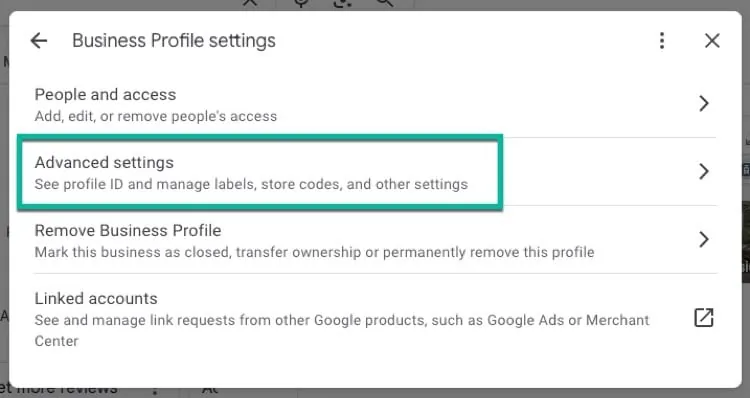
Asking support to recheck your profile only works for technical errors or overly aggressive filtering. It doesn’t fix everything.
If a customer went into their own account and clicked delete, that action is final. No form or support agent can undo a user’s choice to remove their own writing. Your only option is to politely ask them to write a new one.
If the review contained profanity, private personal details, or off-topic rants about a different company, it violated the posting rules. The system did exactly what it was built to do. Filing a ticket for a legitimate removal wastes your time and delays help for people who actually suffered a glitch.
Businesses often misread this delay as a bug. They file repeated tickets over a working filter. Each duplicate report pushes your case to the back of the queue.
If your profile was suspended and reinstated, historical reviews sometimes fail to migrate back. This happens frequently with older listings that underwent major category changes. In that scenario, you’re starting fresh. Focus on generating new, compliant feedback rather than fighting to resurrect data from a closed account state.
You can verify which situation applies by checking your notification history. A suspension always generates an email warning before the listing goes dark.
Accepting these limits saves you hours of frustration. Not every disappearance is a mistake.
Frequently asked questions
Can I recover deleted reviews?
No, you can’t recover a review if the customer deleted it from their own account. Once a user removes their post, the action is permanent. You can only request recovery for reviews that the automated system flagged and hid by mistake.
Why did my rating drop suddenly?
Your rating drops suddenly when the filter removes several high-star reviews at once. Even losing two or three five-star posts shifts the mathematical average downward. Check your total review count to confirm if posts were removed.
How long does a recheck take?
A standard recheck takes 3 to 5 business days for small losses. If you lost more than ten reviews, expect the process to stretch toward 14 business days. Submitting duplicate tickets during this window restarts your wait time.
Is it safe to buy replacement reviews?
No, buying replacement reviews violates platform policies and consumer protection laws. The algorithm detects unnatural posting patterns quickly. Getting caught leads to permanent profile suspension, removing all your legitimate feedback alongside the fake ones.
What happens if my profile gets suspended?
If your profile gets suspended, all your reviews become invisible to the public immediately. You must complete the reinstatement process through the dashboard. After approval, most valid reviews reappear within a few days, though some historical data might not transfer.
Can staff review their own workplace?
No, staff members reviewing their own workplace triggers a conflict of interest filter. The system links employee accounts to the business location. Those reviews get removed permanently, and repeated attempts can flag the entire profile for manual inspection.
Conclusion
Missing feedback can sting, but it doesn’t have to slow you down. Focus on giving your customers a great experience today, and they’ll happily share it online. If things still look off next week, reach out to support again—you’ve got this.

Robert Miller works as a Reputation Management Consultant. He has been helping U.S. businesses for over ten years. His work involves helping people protect and enhance their online image.Robert has worked with a wide range of companies. He has helped new businesses, local places that give a service, and big companies. He helps turn customer reviews into something that helps people trust their company and drives business growth.