Google Play reviews are more than just a collection of star ratings—they provide valuable feedback that can influence how users perceive your app and help developers identify opportunities to improve the product. Google Play considers user feedback, including ratings and reviews, alongside relevance, engagement, and the overall quality of the app experience when organizing and ranking apps.
To enhance your app’s ranking potential, focus on earning genuine, relevant, and consistent reviews by delivering an app experience that users actually value. Make your app reliable, fast, intuitive, and useful, then make it easy for satisfied users to share honest feedback at appropriate moments. Google specifically recommends earning ratings through a high-quality user experience rather than using incentives, fake reviews, or other manipulative tactics.
Review management should also be part of your ongoing growth strategy. Monitor recurring complaints, identify common themes, respond professionally to user concerns, and use feedback to improve features, stability, performance, and customer support. Play Console provides tools for analyzing ratings and reviews, including review trends, common topics, and comparisons with peer apps.
Ultimately, there is no single review tactic that guarantees a higher Google Play position. The strongest long-term approach is to combine product quality, authentic customer feedback, thoughtful review responses, technical improvements, and continuous optimization. This guide explains practical strategies you can use to improve your Google Play reviews, strengthen user trust, and create better conditions for sustainable app discoverability and growth.
Understanding Google Play Reviews and Their ASO Significance
Google Play reviews are public opinions left by users after trying your app. They usually include Google Play ratings, written comments, and updated impressions after new releases. In the Play Store, these signals help people judge quality quickly.
Yes, ratings and reviews on the Google Play Store do impact app success. They influence ranking, shape first impressions, and often determine whether positive reviews turn interest into installs. They also highlight bugs, crashes, and support issues, which makes them useful for both ASO and product improvement.
The Power of Social Proof for App Discoverability
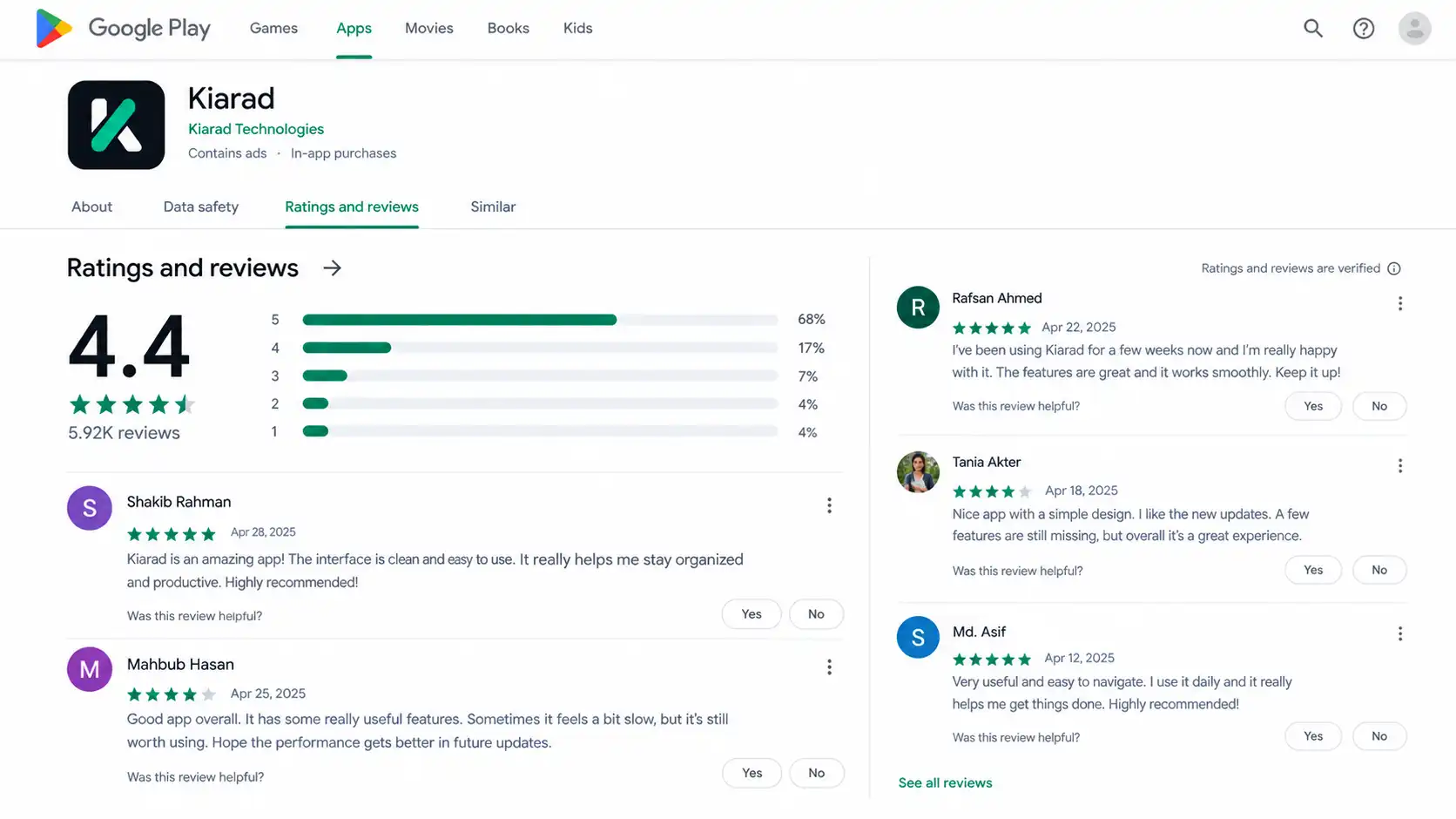
When people compare apps, social proof does heavy lifting. Play users often check Play Store ratings and recent Google reviews before reading a long description. A strong review profile signals that real people have used the app and found value in it. That reduces hesitation.
Potential users usually look for simple trust markers before they install:
- A healthy volume of recent feedback
- Clear signs that other users had a good experience
- Developer replies that show the app is actively maintained
This matters for discoverability because better perception can support stronger conversion from store views to installs. Once more users choose your listing, your app gains momentum. In a crowded category, social proof helps your app look safer, more useful, and more credible than competing options.
Google Play Reviews as Direct Ranking Signals
Reviews do more than persuade people. They also send direct signals that can affect ranking. Google looks at ratings, review freshness, review themes, and overall quality patterns around a Google Play app. Written feedback can help connect your Play Store app with the terms users naturally mention.
Another point matters here. A review comes from a real user activity tied to a Google account, which gives Google more context than a simple visit. If many users mention the same feature, issue, or use case, that feedback can reinforce relevance around those terms.
That does not mean every review instantly boosts visibility. Google also moderates submissions, checks for suspicious activity, and may delay public display for about a day. If approvals take longer than usual, it is often because Google is reviewing activity before showing it publicly.
How Google Play’s Algorithm Evaluates User Reviews
Google evaluates reviews through several signals at once. It looks at Google Play ratings, written comments, timing, and whether feedback keeps coming in steadily. For a Play Store app, these patterns can influence ranking and overall listing strength.
Review approvals sometimes take longer because Google may hold new submissions for roughly 24 hours while checking for suspicious activity. In some cases, the delay is longer. Developers may still see reviews and reply during that period, but the public score or display may not update right away. Next, let’s break down the main review signals.

Keyword Influence Within Review Texts
Review text can help Google understand what users believe your app does. When people naturally mention a feature, task, or problem, that language may support keyword relevance in the Play Store. This is especially useful for long-tail search phrases that are not always obvious in your store listing.
The key is natural language. You should not try to manipulate Google reviews or push users to repeat exact terms. Instead, improve the app experience so people describe real outcomes in their own words. Those patterns often reveal what matters most to users.
Your store listing still needs strong metadata in the title, short description, and long description. Reviews do not replace that work. They complement it by adding real user feedback around your main keyword themes, which can strengthen relevance and help your app appear for more specific search intent.
Star Ratings, Recency, and Review Velocity Explained
Not all review signals carry the same weight. Star ratings create the fastest impression, while recency and review velocity show whether your app is improving or slipping. If feedback is old, users may assume the app is no longer maintained. Fresh positive feedback usually signals active support and better customer satisfaction.
A practical benchmark matters too. Maintaining strong star ratings, especially around 4.0 or higher, helps your app look safer and more appealing. Low ratings can hurt trust, limit installs, and increase the pressure on every new release.
| Signal | What it suggests |
| Star ratings | Overall quality and user satisfaction at a glance |
| Recency | Whether feedback reflects the current version of the app |
| Review velocity | Whether new opinions arrive consistently over time |
| Positive feedback | Signs of value, stability, and a good user experience |
| Customer satisfaction | Reduced friction, fewer complaints, and stronger retention |
The Impact of Reviews on App Downloads and Credibility
Play Store reviews strongly affect whether people install your app. Before tapping download, Play Store users often read customer feedback to judge stability, usefulness, and support quality. That makes reviews a credibility layer, not just a comment section.
Are Google Play Store reviews reliable for finding good apps? They can be useful when you look at recent trends, detailed comments, and reply patterns. Satisfied customers usually mention clear benefits, while repeated complaints often reveal real problems. The next sections show how trust and feedback cycles influence installs and uninstalls.
User Trust Factors and Conversion Rates
Trust drives installs. When users land on your listing, they quickly decide whether your app feels credible. Positive reviews and thoughtful Google reviews can lift user trust before anyone reads the full description. If the review section feels active and authentic, your conversion rate has a better chance of improving.
People usually look for a few simple signs:
- Recent comments that match the app’s current experience
- Specific praise instead of vague statements
- Clear developer replies when issues appear
Negative sentiment changes the picture fast. If users repeatedly mention crashes, billing confusion, or poor support, confidence drops. Lower trust means fewer installs, even if your screenshots look strong. That is why reviews affect both ASO and conversion at the same time. They shape what users expect before they ever open the app.
Managing Feedback Cycles to Prevent Uninstalls
A weak review cycle can turn into a growth problem. Poor customer feedback discourages new installs, but it also warns existing users that the Google Play app may not be improving. If complaints keep repeating, uninstalls often follow. That creates a bad loop: worse sentiment, lower trust, fewer downloads, and more churn.
The best way to break that cycle is to act on review themes quickly. Track issues by app version, device, market, and language. Fix common bugs, explain changes in update notes, and improve your response rate so users see that feedback is being handled.
Support matters here as much as code. A clear, calm reply can reduce frustration and sometimes lead users to update their rating after a fix. That protects your reputation and limits the ranking damage caused by unresolved complaints.

Frequently Asked Questions
Q: Can I export Google Play reviews for free, and what tools are recommended?
A: Yes, you can export Google Play reviews through Play Console analysis and review management workflows. Many developers use tools that organize review data by version, language, and market, then move it into Google Sheets for reporting. The best tools are AppFollow and AppTweak, which make export simple and help you track Play Store trends clearly.
Q: How do ratings and reviews affect app success and visibility on Google Play?
A: Google Play ratings and written reviews support app success by influencing visibility, conversion, and trust in the Play Store. Strong customer satisfaction usually leads to better install decisions, while repeated complaints can hurt credibility and retention. Reviews also help Google understand relevance, freshness, and overall quality signals around your app.
Q: What’s the best way to flag fake or inappropriate Google Play reviews?
A: The safest approach is to report fake reviews or inappropriate reviews through official Play Store and Play Console options, rather than trying to fight them publicly. Report them through Play Console or the Play Store, where Google reviews them against its policies. Never buy fake reviews yourself, because that violates Google Play policies and can harm your app.
Conclusion
In summary, Google Play reviews are crucial not only for improving your app’s rankings but also for building trust and credibility with potential users. By understanding how the algorithm evaluates reviews and implementing effective strategies for acquiring positive feedback, you can can strengthen your app’s visibility and conversion rates your app’s visibility and conversion rates.
Remember, maintaining a solid star rating and managing user feedback effectively can set you apart in a competitive marketplace. As you work to optimize your app’s presence on Google Play, consider these actionable insights to elevate your app’s reputation. To further explore tailored solutions for your app’s success, don’t hesitate to get in touch for a free consultation!

Robert Miller works as a Reputation Management Consultant. He has been helping U.S. businesses for over ten years. His work involves helping people protect and enhance their online image.Robert has worked with a wide range of companies. He has helped new businesses, local places that give a service, and big companies. He helps turn customer reviews into something that helps people trust their company and drives business growth.