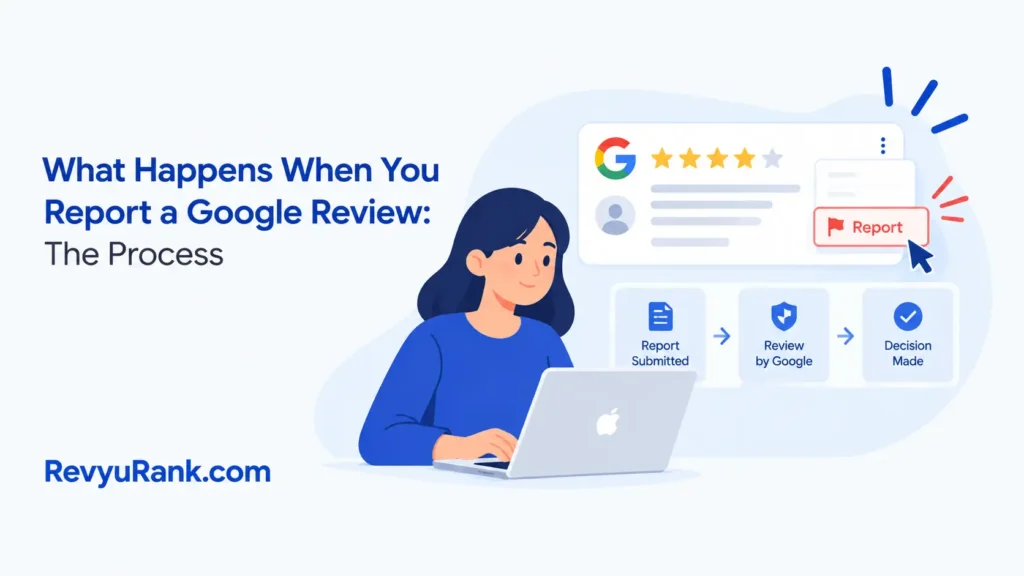
When you report a Google review, it enters an automated check against the platform’s content policies. The reviewer isn’t told who flagged it, and they don’t get a chance to argue back during that first pass. If the system or a human evaluator finds a clear policy violation, the review disappears from the business profile entirely. If it doesn’t break any rules, it stays up exactly where it was.
What happens after reporting a Google review

- The report goes into an automated queue; no human looks at it immediately unless the system flags it for manual review.
- Most reports never reach a person. The algorithm checks for patterns like spam links or known fake accounts first.
- The reviewer gets no notification that you reported their feedback, so they can’t retaliate right away.
- Processing takes anywhere from 3 to 14 days, depending on how complex the policy violation is.
- Simple conflicts of interest clear faster than nuanced harassment claims requiring context analysis.
- You won’t get an email confirming the outcome; you have to check your business profile yourself.
- People waste hours refreshing daily because they expect an alert. Bookmark the reviews tab and check weekly instead.
- If the review breaks Google’s prohibited content policies, it’s removed without warning the person who wrote it.
- If the review follows the rules but you just dislike it, it stays visible permanently.
- A negative experience described accurately will always survive your report. Save your appeals for actual violations.
Why reported reviews disappear or stay
The system only removes text that violates specific written rules, not opinions you disagree with. A one-star rating calling your food “terrible” is a protected opinion, even if it hurts your sales. But a review containing hate speech, personal phone numbers, or proof the person never visited your business breaks the rules. That distinction is the entire mechanism behind the removal process.
If your complaint is about a competitor leaving fake five-star reviews on their own page to outrank you, the same policy applies. You flag it as spam or conflict of interest. The evaluation team checks the account history. An account that has reviewed fifty pizza shops in one city over two days looks like a spam ring. A real customer’s single angry visit looks different.
You don’t get to see the evidence the reviewer submitted, and they don’t see yours. It’s a blind check. This keeps people from harassing each other, but it also means you can’t build a case file together. You submit your reason, pick the closest policy category, and wait.
There’s a trade-off here. The strict rule-based approach stops businesses from deleting every bad experience by clicking a button. But it also means genuinely unfair reviews survive if the writer was clever enough to avoid banned words. You can’t win a tone argument; you can only win an argument about facts and rules.
This path isn’t for someone trying to clean up a profile full of legitimate complaints. If your service was actually poor and ten people said so, reporting them wastes your time. The system is built to catch fraud, spam, and abuse, not to protect a business from its own shortcomings.
The timeline shifts based on the type of violation you select. Spam and fake engagement might get processed faster because algorithms catch patterns quickly. Harassment or legal issues often require a human reviewer, which pushes the wait closer to that two-week mark. You’ll find the exact list of restricted content categories on your Business Profile dashboard under the review management section.
Situations where reporting a review changes
The standard process assumes a simple policy violation on a regular business profile. Different conditions change the timeline, the method, or the result entirely.
| Situation | What changes | What to do instead |
|---|---|---|
| Review contains illegal threats | Police involvement required | File a local report, then contact support |
| Competitor spam attack | Multiple reports needed | Flag all fake accounts simultaneously |
| Reviewer updated their text | Timer restarts completely | Submit new report for edited version |
| Business permanently closed | Profile access lost | Contact support through help center |
| Review violates local privacy laws | Legal removal path opens | Submit formal legal request form |
| Account suspended during process | Review hides automatically | Wait for account reinstatement first |
A competitor attack looks different from random angry customers. Check if the negative reviews arrived within the same forty-eight hours. Look for identical phrasing across multiple profiles.
If your business is marked permanently closed, you lose the ability to flag reviews directly. The reporting button disappears entirely from the interface.
Don’t try to reopen the profile to regain reporting access. That creates a false listing and invites fresh penalties. Use the general help center contact form instead.
Steps to report a review correctly
-
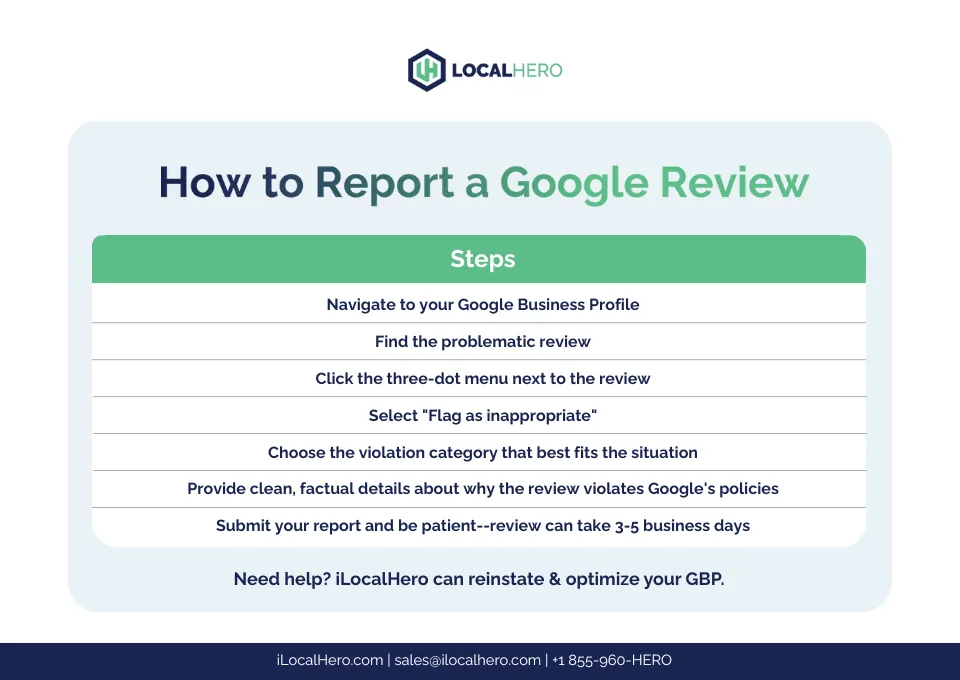
Sign in to the Google account that manages your Business Profile. Navigate directly to the “Reviews” tab on your dashboard. Find the specific review you want to challenge. Click the three vertical dots next to it and select “Report review.” Don’t use a personal account that isn’t linked to the business, or the option won’t appear.
-
Choose the exact policy category that matches the violation. Don’t pick “spam” if the real issue is a privacy leak. Selecting the wrong category sends the report down the wrong automated path, and it’ll likely be rejected. Read the short description under each option before clicking.
-
Write a brief explanation if the tool gives you a text box. Stick to facts: dates, order numbers, or proof the person never visited. Don’t write an emotional paragraph about how much money you’re losing. Evaluators spend seconds on each case, so make your point immediately.
-
Check your review count daily for the next 14 days. You won’t receive an alert when the decision is made. The review simply vanishes from your public profile if it’s removed. If it’s still there after two weeks, the system decided it didn’t violate policies.
-
If the review stays up and clearly breaks a rule, submit an appeal through the Business Profile Help Center. You get one appeal per report. Include any new evidence you didn’t attach the first time, like security camera timestamps proving the reviewer wasn’t there.
-
If the text includes actual threats of violence or extortion, stop relying solely on the reporting tool. Contact local law enforcement first. Then reach out to Google’s legal support team with your police report number. The standard content filter isn’t built to handle criminal behavior quickly enough to keep you safe.
Errors that ruin a review report

Picking the wrong policy category because you didn’t read the descriptions guarantees an automatic rejection within days. If a reviewer mentions a competitor by name, that’s a conflict of interest, not spam.
Reporting a negative opinion as “spam” just because it’s a one-star rating wastes your one appeal chance on a doomed request. The platform only removes reviews that violate specific content rules.
Arguing with the reviewer in your public reply while waiting for the report signals to evaluators that you’re engaged in a dispute rather than handling abuse. Keep your response under two sentences and strictly factual.
Using a personal Gmail account instead of the verified business manager login means your report gets ignored. The system can’t verify your authority unless you submit through the exact profile linked to your listing.
Expecting an email notification when the review drops leads you to miss the window for an appeal. Check your live profile daily until the ticket resolves.
Frequently asked questions
How long does it take for a reported review to go away?
It takes 3 to 14 days for a reported review to be evaluated, assuming you selected the correct policy category and provided clear details. Complex cases involving legal violations push toward the longer end of that range. You won’t get an update email, so you must check your live business profile daily. If it hasn’t disappeared after two weeks, the system kept it up.
Can the person see that I reported their review?
No, the reviewer receives zero notification that you flagged their text. The entire process is anonymous to protect business owners from retaliation. They will only notice if they revisit your profile and see their own text is missing. Even then, they aren’t told who triggered the removal or why it happened.
Does reporting a review hurt my overall rating?
Reporting a review doesn’t change your star average while the investigation is active. The review stays visible and continues counting toward your score until it’s officially deleted. Once removed, your average recalculates automatically within 24 hours. Flagging fifty reviews at once won’t tank your score, but it won’t improve it either until decisions are made.
Is it safe to reply to a review I already reported?
Yes, you can reply publicly while waiting for the evaluation. However, keep your response strictly professional and factual. An angry or defensive reply can make your business look worse to future customers reading the thread. If the review is eventually removed, your reply disappears with it automatically.
Why did my report get rejected?
Reports fail when the text doesn’t actually violate written policies. A rude customer having a bad day isn’t breaking rules, even if they’re unfair. The system only removes spam, hate speech, conflicts of interest, or privacy leaks. If your reason was just “this isn’t true,” the automated check will reject it every time.
What happens if I report too many reviews at once?
Only report genuine violations. Space them out over several days if you legitimately found multiple fake entries from a coordinated attack.
Can I report a review left on a competitor’s page?
Yes, you can report reviews on other business profiles if they violate policies. You don’t need to manage that profile to flag spam or fake engagement. Use the same three-dot menu on their public listing. The evaluation process works identically, though you still won’t receive updates on the final decision.
Does a removed review come back later?
A deleted review stays gone permanently unless the original author writes a brand-new one. The system doesn’t restore text after a successful removal. However, if you appealed a decision and lost, the original text remains visible. There’s no temporary hiding period; it’s either fully live or completely erased.
Conclusion
Every business faces unfair feedback eventually, but the reporting tool only fixes actual rule-breaking. Save it for spam, fraud, and abuse. For the rest, a calm, factual public reply usually does more for your reputation than a hidden report ever could.

Robert Miller works as a Reputation Management Consultant. He has been helping U.S. businesses for over ten years. His work involves helping people protect and enhance their online image.Robert has worked with a wide range of companies. He has helped new businesses, local places that give a service, and big companies. He helps turn customer reviews into something that helps people trust their company and drives business growth.