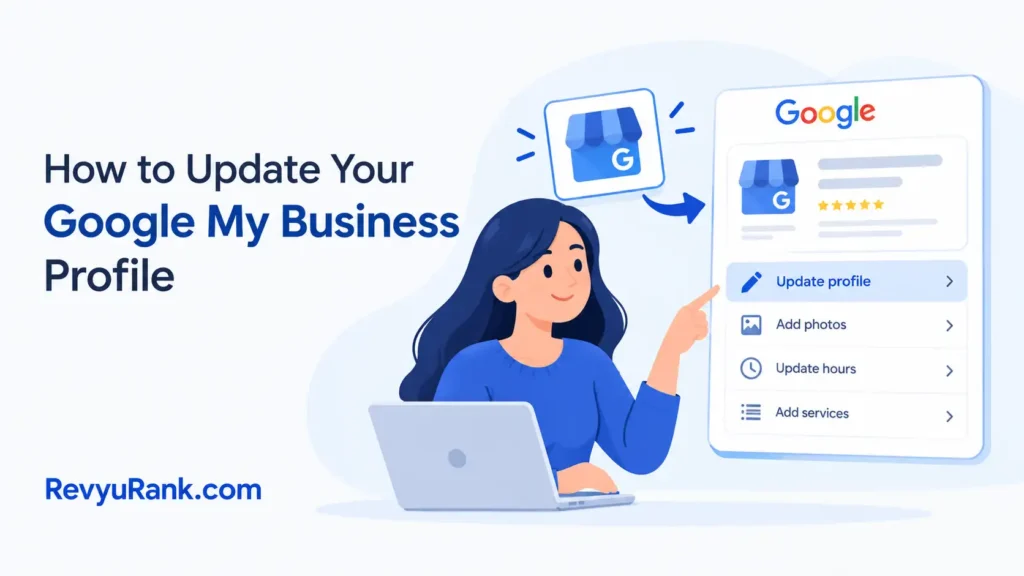
You update your Google My Business profile by signing in at google.com/business or in the Google Maps app, selecting your business, and editing details like hours, photos, address, or services. Most changes go live in minutes, though some edits need review and can take a few days to appear in Search and Maps.
The thing that decides whether your edit sticks is accuracy against your real-world details. Google cross-checks your info with other sources online, so a phone number or address that doesn’t match elsewhere can get flagged or reverted.
The most common mistake is editing a field and assuming it’s live. Many edits sit “pending review,” and if you close the tab, you’ll think it saved when it hasn’t. Always check the status after you hit save.
How to edit your business profile

- Sign in to the right account. Go to google.com/business or open the Google Maps app, then sign in with the email that owns the profile. If you’re not the owner, you can’t edit — request access from the current owner first.
- Open the profile you want to change. On Maps, tap your profile picture, then “Your Business Profile.” On desktop, search your business name while signed in.
- Click Edit profile. Pick the field — name, category, hours, phone, website, address, or service area.
- Update one section and save. Change the hours, add special holiday hours, or fix the category. Save after each section.
Tip: Add up to 3 holiday hours ahead of a long weekend so customers don’t show up to a closed door.
- Add photos and posts. Upload clear photos (Google recommends JPG or PNG). Add a post for an offer or event.
Tip: Don’t edit your business name to stuff in keywords. That breaks Google’s rules and can get your profile suspended.
- Check the status. Look for “Published” or “Pending.” Pending edits are under review and aren’t live yet.
How long does a Google My Business update take?
Most edits appear fast, but review times vary with what you change and your profile’s history. Sensitive fields like address and name take the longest because Google verifies them.
| Situation | How long | What changes it | What to watch for |
|---|---|---|---|
| Hours, photos, posts | Minutes to a few hours | Low-risk fields | May still say “pending” briefly |
| Phone or website | A few hours to 3 days | Cross-checks with other listings | Mismatch can revert it |
| Business name | Up to several days | Flagged for keyword stuffing | Suspension risk if it breaks rules |
| Address or category | A few days | May need re-verification | Could trigger a postcard verification |
| New or reinstated profile | Up to 5+ days | Trust history is low | Extra manual review |
If an edit sits pending longer than a week, check your email for a verification request or contact Google Business Profile support.
How to know your profile edit is live

The clearest sign is the status label inside your profile dashboard. An edit reads “Published” when it’s live and “Pending” or “Under review” while Google checks it. Open an incognito window and search your business name on Google and Maps — if the public listing shows your new hours or photo, it’s done.
If the dashboard says published but the public view still shows old info, clear your browser cache or wait a few hours for Search to refresh. When the two disagree, trust the public incognito view — that’s what customers actually see. Google’s own Business Profile Help explains which edits trigger review.
Mistakes that break your profile edits

- Keyword stuffing the business name. Adding “best plumber near me” to your name violates Google’s name rules and can suspend the whole profile. Use only your real business name as it appears on signage.
- Inconsistent contact details. A phone number or address that doesn’t match your website or other directories gets flagged and reverted. Make the same info appear everywhere before you edit here.
- Ignoring the pending status. Closing the tab after saving doesn’t mean the edit went through. Wait for “Published” before you assume it’s live.
- Creating a duplicate profile. Making a second listing instead of claiming the existing one splits your reviews and confuses Google. Search first and claim the one that’s already there.
- Wrong primary category. Picking a loose category hides you from the right searches. Choose the single category that best fits your core service.
Frequently asked questions
How long does a Google My Business update take to show?
Most low-risk edits like hours, photos, and posts show within minutes to a few hours. Phone and website changes take up to 3 days, and name or address edits can take several days because Google verifies them against other sources.
Why is my Google Business update not showing?
Your edit is likely still pending review, or the public listing hasn’t refreshed yet. Check the status in your dashboard. If it says published, clear your cache or wait a few hours. A mismatch with other listings can also cause a revert.
Can I update my business hours without verification?
Yes. Hours, photos, and posts don’t require re-verification and usually publish within hours. Verification is only triggered by sensitive changes like your address, business name, or when Google can’t confirm you still own the location.
Is it safe to change my business name on Google?
Yes, if you’re correcting it to match your real-world name. It’s not safe to add keywords or locations — that breaks Google’s naming guidelines and can suspend your profile. Edit only to reflect your actual signage.
What happens if my edit is rejected?
The field reverts to its previous value, and you may see a notice in your dashboard. Rejections often come from keyword-stuffed names or details that don’t match other sources online. Fix the underlying info, then resubmit the edit.
How do I update my profile if I lost access?
Request ownership through google.com/business by searching your business and clicking “Request access.” The current owner has 7 days to respond. If there’s no response, Google may transfer access after reviewing your request.
Can I edit my Google Business Profile from my phone?
Yes. Open the Google Maps app, tap your profile picture, then “Your Business Profile.” You can edit hours, photos, posts, and most details there. Some sensitive changes still route through the same review as the desktop version.
Conclusion
Set a reminder to check your profile every month or so, because small details drift out of date faster than you’d think. If a holiday’s coming up or your hours shift for a season, edit it early so customers aren’t left guessing. A few minutes of upkeep keeps people showing up when you’re actually open.

Robert Miller works as a Reputation Management Consultant. He has been helping U.S. businesses for over ten years. His work involves helping people protect and enhance their online image.Robert has worked with a wide range of companies. He has helped new businesses, local places that give a service, and big companies. He helps turn customer reviews into something that helps people trust their company and drives business growth.