Ai review management tools can collect reviews, suggest replies, find repeated complaints, and show rating trends, but they still need human approval for public responses. Choose a tool that connects to the review sites your business uses, protects customer data, and lets you export its records. If you manage one location, a simple inbox may be enough; if you manage many locations, look for permissions, reporting, and location-level workflows.
The right choice changes with your review volume, the platforms involved, and the risk of a wrong reply. Your industry also matters: a restaurant can use a different tone from a medical practice or financial company. Pricing, supported sites, AI controls, and data storage can change by plan, so check each vendor’s current documentation before you sign up.
Who needs review management software
A local owner with one Google Business Profile usually needs a clear view of new reviews and fast reply drafts. A basic review inbox can serve this need if it includes approval before publishing.
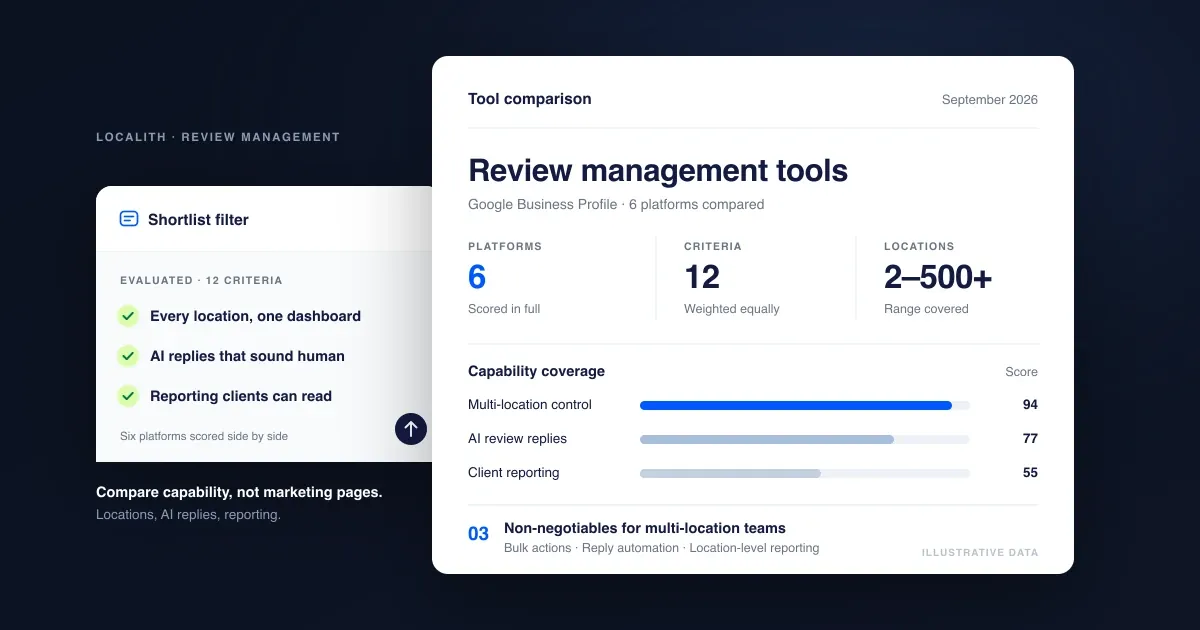
A marketing manager may oversee several locations, people, or brands. This reader needs filters by location, user permissions, reply templates, sentiment labels, and reports that separate a real service issue from a simple comment. A tool that only creates text may save writing time but still leave the manager doing the tracking by hand.
An agency or large operations team needs stronger controls. It may need client separation, audit records, exports, alerts, and a way to stop an AI draft from publishing without review. It should also confirm whether the tool supports each client’s review platforms rather than assuming that one connection covers every site.
This page serves businesses that already receive legitimate customer reviews and want help organizing and responding to them. It assumes you can access your review profiles, know which staff may reply, and can check drafts before they go live. It’s not aimed at someone trying to create reviews, remove fair criticism, or automate every public response without oversight.
What changes the result
Connected review sites matter most. A tool can only monitor a platform it actually supports and can legally connect to. Write down every site where customers leave reviews, such as Google, Yelp, Tripadvisor, or an industry-specific platform, then compare that list with the vendor’s current integration page. If one important site is missing, the dashboard won’t be complete.
Review volume changes the value. With five new reviews a month, a shared inbox and a few saved reply patterns may be enough. With dozens of reviews each week, duplicate alerts, filters, assignment rules, and bulk reporting become more useful. Count new reviews across all locations for a typical month before comparing plans.
Location structure affects the setup. One business location can often work with one workspace and one approval path. A chain needs separate location records, local permissions, and reports that don’t mix one store’s complaints with another’s. Ask the vendor to show a sample multi-location report, not just a general product demo.
AI controls decide the risk. Some products only draft replies. Others may classify sentiment, summarize themes, or publish after an approval setting. Read the exact workflow: who approves, where the draft is stored, whether edits are logged, and how staff can disable automatic publishing. The mistake people get wrong most often is treating a fluent draft as a verified fact.
Data handling can change the decision. Reviews may contain names, order details, health information, or other personal data. Check the vendor’s privacy terms, retention settings, account permissions, and deletion process. If your industry has extra privacy duties, ask your legal or compliance team before sending review text to an outside service.
The main trade-off is speed versus control. More automation can reduce routine work, but a human approval step adds time and lowers the chance of an unsupported promise, private detail, or defensive reply reaching the public.
How to set up review monitoring
Start with the platforms you already use. Don’t begin by choosing the most impressive AI feature, because an attractive dashboard isn’t useful if it misses your main review source.
-
List every review platform where your business has a profile. Record the profile name, location, login owner, and the last review date you can see. The list is complete when it matches your own website, receipts, social profiles, and customer emails.
-
Count one normal month of reviews for each location and platform. Use the platform’s own history when available, and mark unusual periods such as a launch or holiday. This gives you a working volume instead of a guess.
-
Check each vendor’s integrations against that list. Confirm whether the connection can read new reviews, identify the location, and send an approved reply. Don’t assume that “supported reviews” means every platform or every plan is included.
-
Create user roles before importing data. Give reply approval to the person responsible for customer communication, and give reporting access only to staff who need it. Test one account at a time until the right permissions appear.
-
Set reply rules for tone, greetings, refunds, private information, and escalation. Write the rules in plain language, such as “never promise a refund in a public reply.” A test draft should follow the rules without adding claims you didn’t provide.
-
Connect one location first and wait for a new review or use an approved test workflow. Check that the review text, star rating, location, timestamp, and reply status are correct. Don’t connect every location until this record matches the platform.
-
Turn on alerts and approval for new reviews. Keep automatic publishing off until your team has reviewed enough drafts to understand the tool’s errors and omissions. The approval screen should show the original review beside the proposed reply.
-
Create issue labels that match your operation, such as wait time, product quality, billing, delivery, or staff conduct. Test each label on real examples and remove labels that overlap so reports stay useful.
-
Export or record a baseline report before changing your process. Save the review count, average rating shown by the platform, open issues, and unanswered reviews. The report should identify the location and date range.
-
Review the first batch manually with the staff who handle customer issues. Approve only replies that are accurate, respectful, and free of private details. If the tool invents facts or misses urgent complaints, stop automation and contact the vendor before expanding the setup.
The judgment call is whether a draft is merely polite or actually safe to publish. If it needs a fact from an order, employee record, medical file, or legal case, stop the public reply and send the issue to the person who can verify it.
Review tool choices at a glance
The best setup depends on review volume, locations, and how much approval work your team can handle. Choose the simplest workflow that covers every platform you need; a cheaper inbox isn’t useful if staff must copy reviews from unsupported sites. As volume rises, protect time for approvals rather than adding automation that no one checks.
| Situation | What to do | What it takes | What to watch for |
|---|---|---|---|
| One location, few reviews | Use a basic inbox | Low setup effort | Missing platform support; confirm every review site appears before relying on it |
| One location, frequent reviews | Add AI drafts | Daily approval time | Generic replies; check drafts for details about the visit, and edit before posting |
| Several locations | Use location filters | Structured setup effort | Mixed reporting; standardize location names so ratings and response activity don’t merge |
| Agency managing clients | Require separate workspaces | More administration | Cross-client access; give each client its own users, templates, and reporting view |
| Sensitive industry | Keep human approval | Compliance review | Private information; remove unnecessary patient, customer, or case details from replies |
| No direct integrations | Use manual imports | Extra staff time | Delayed records; record the review date and source so imports don’t create duplicates |
If one person handles approvals, start with drafts only when that person can review them consistently. Automated publishing suits neither sensitive replies nor accounts where a wrong detail could create a complaint. When a platform is unsupported, use a manual-import process rather than assuming the inbox is complete. That extra step is preferable to overlooking a negative review or reporting an incomplete rating.
Details that improve AI replies
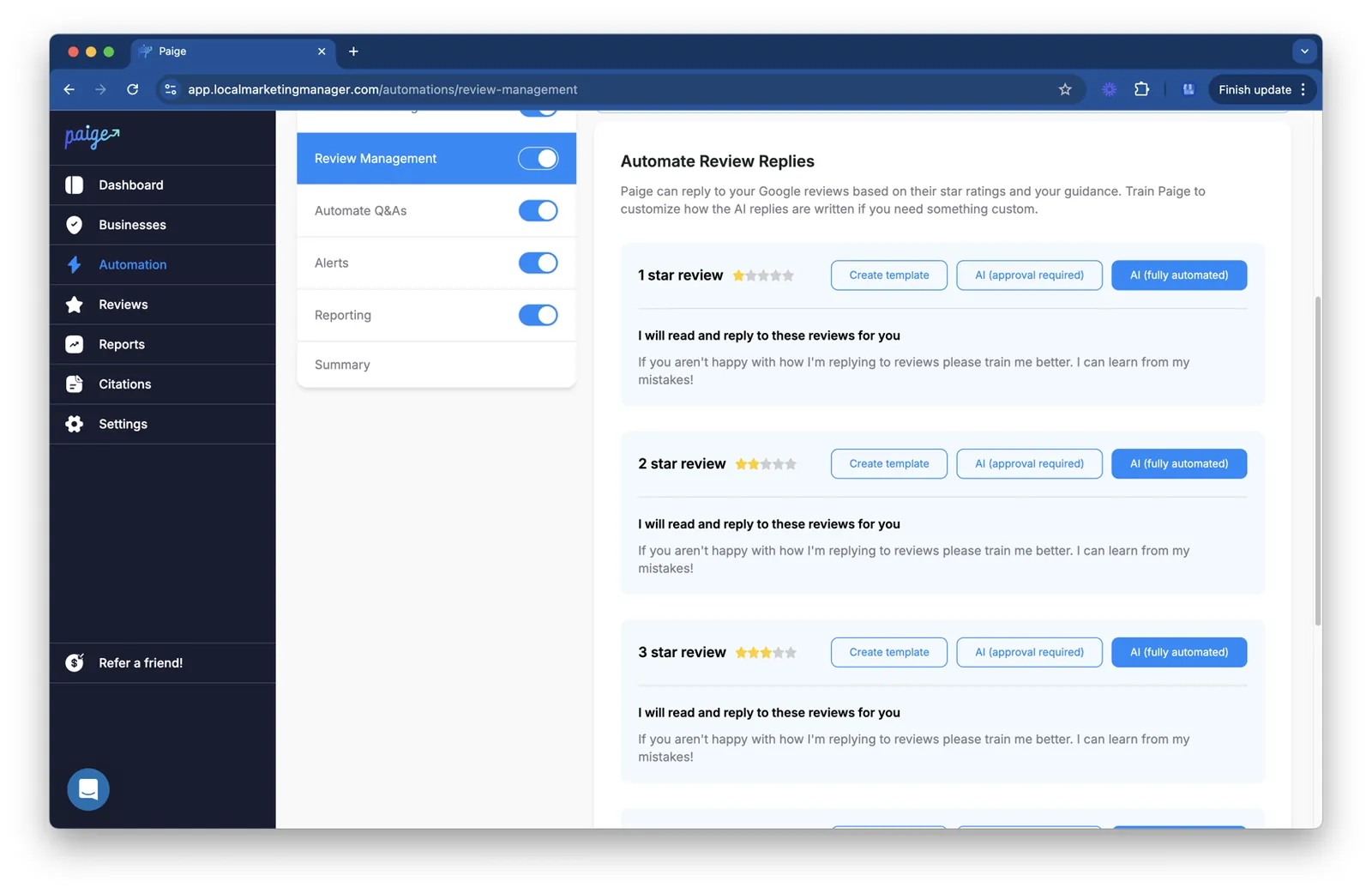
Prepare facts before drafting
Good replies start with facts the tool can safely use. Add the business name, location, service types, approved contact channel, refund policy, and escalation route. Keep claims specific, and remove old promotions or policies that no longer apply.
Use the original review as the main source. If a customer says a delivery was late, the draft can acknowledge the delay and invite private contact. It shouldn’t claim that the order was refunded, the driver was disciplined, or the problem is fixed unless a staff member has checked those facts.
A useful test is to compare three drafts for the same review: a positive comment, a factual complaint, and an angry complaint. The tone may change, but the reply should never expose private data or argue about a customer’s experience. If it does, tighten the instructions before using more automation.
Check the reply while it’s happening
Review the draft beside the original text, not from a summary alone. Look for four things: the correct location, a direct response to the issue, no invented details, and a clear next step. A polished reply that answers the wrong complaint still creates work for the customer.
Keep replies short when the issue is simple. For a serious complaint, move the details to a private channel while acknowledging the public concern. Don’t ask for an order number, phone number, health detail, or other personal information in a public response.
Experienced teams also leave some work alone. They don’t force an AI label onto every review, rewrite sincere praise into marketing copy, or answer a threat, discrimination claim, injury report, or legal demand with a standard template. Those cases need a trained staff member and, where appropriate, legal or compliance advice.
Common review workflow problems
A tool can make review work more visible without fixing the underlying service issue. Match what you see with the first safe action rather than changing every setting at once.
| What you notice | What it usually means | What to do first | How to stop it happening again |
|---|---|---|---|
| Reviews never appear | Connection or permission failure | Recheck profile access | Test connections monthly |
| Wrong location appears | Profiles are mapped incorrectly | Pause affected drafts | Verify location IDs |
| Replies sound identical | Template is too broad | Rewrite reply rules | Add issue-specific examples |
| AI invents a resolution | Facts weren’t supplied | Delete unsupported claim | Require human fact checks |
| Urgent complaint gets tagged | Labels miss escalation terms | Send to manager | Add escalation keywords |
| Duplicate reviews appear | Multiple sources overlap | Compare review IDs | Keep one source of truth |
| Replies stay unpublished | Approval owner is missing | Assign a reviewer | Add a backup approver |
The costly mistake is publishing a confident answer before checking the original review. It can turn a small service complaint into a public correction, a privacy problem, or a promise your business can’t keep.
Rules for public review replies
The Federal Trade Commission’s Consumer Reviews and Testimonials Rule applies to certain deceptive review practices in the United States. It addresses fake reviews, bought reviews tied to required sentiment, and review suppression. Read the FTC review rule guidance before designing an automated review program.
The rule doesn’t generally prohibit asking customers for reviews. It does prohibit conditioning an incentive on a review expressing a particular sentiment. If you offer an incentive, check whether disclosure is required and keep the offer available without asking for a positive review.
The rule isn’t permission to collect or publish anything an AI system creates. Use real customer experiences, truthful replies, and a documented process for incentives. Requirements can also differ by state, country, industry, platform, and contract.
Platform rules add another limit. Google, Yelp, Tripadvisor, and other services publish their own terms for solicitation, user data, and responses. Check the current policy page for every platform you connect. An integration doesn’t override those rules, and a policy change can make an existing workflow noncompliant.
Don’t use automation to create fake customer experiences, post staff reviews as customers, or hide criticism by sending only happy customers to a public review page. Don’t expose order details, contact information, or other private facts in a reply.
If a complaint involves a potential injury, discrimination, regulated advice, or legal demand, pause automation and send it to the appropriate manager, compliance officer, or attorney. Keep a human approval step for replies that make factual claims, offer compensation, or discuss a dispute.
What review management really costs
The money cost depends on the vendor, plan, locations, users, and connected platforms. Prices change, so compare the current pricing page with the features you actually need instead of relying on an old comparison or a free-plan label.
Time is often the higher cost. You’ll spend time connecting profiles, mapping locations, writing approved facts, checking permissions, reviewing drafts, and training staff. A small business may prefer a cheaper tool that requires more manual work, while a multi-location team may pay more to reduce repeated checks.
Human review remains part of the cost. If every public reply needs approval, estimate the minutes needed for one review and multiply that by your normal monthly review count. If the answer changes sharply during busy weeks, choose a workflow that lets you handle spikes without publishing automatically.
Risk also has a price. A wrong reply can expose private information, make an unsupported promise, or damage trust. Compare tools by asking whether they keep an approval record, show the source review, separate locations, allow exports, and let an administrator turn off automation quickly.
Your actual cost varies most with review volume and the number of locations; read your current platform counts and each vendor’s plan limits to place your business on the right side of the comparison.
Keeping review data reliable
Keep one named owner for each connected profile, plus a backup who can access the register when that person is away. Record the profile, location, platform, assigned staff, approval status, and last verification date in the tool or in a separate internal register.
Note ownership changes there rather than relying on memory. This makes it easier to spot a missing connection when a review appears on the platform but not in the dashboard. If a profile has no owner, treat it as unverified until someone confirms access and coverage.
Check the dashboard against the original platform whenever a review looks wrong or during an audit of a connection. Compare the reviewer name, star rating, text, date, location, and reply status. Record the platform’s review URL or another identifying detail when the tool allows it. If one field differs, don’t publish from the tool until you know which record is current. A changed name or edited text may require a fresh comparison, not a correction made only inside the dashboard.
Review your rules when the business changes its hours, refund process, contact channel, locations, or products. First identify which templates and automated instructions mention the changed detail. An old instruction can create a reply that sounds professional but gives customers the wrong next step. Remove retired templates instead of leaving them available beside new ones. After updating a rule, check a sample reply for each affected location or issue type before allowing it to be used.
A connection needs attention when reviews stop arriving, a location label changes, replies remain pending, or the tool shows duplicate records. Check the original platform before reconnecting. A review may be absent there, filtered by location, or delayed in the dashboard.
Reauthorize only through the vendor’s normal account process. If access fails or data disappears, stop changing settings and contact the platform or software vendor. Keep the time and error message in the register so the next person doesn’t repeat failed attempts.
When AI review tools aren’t right

AI review tools aren’t a good first choice if your business receives only occasional reviews and one person can answer them safely in the platform itself. A direct workflow may cost less and create fewer access and privacy decisions. If replies take only a few minutes, adding software may solve a larger problem than the one your team actually has. That’s especially true when you don’t need to copy customer information into another system.
They’re also the wrong choice when your main problem is service quality rather than response speed. If customers repeatedly report late delivery, billing errors, or unsafe conditions, use an operations investigation and a customer-service process first. Better wording won’t repair the cause. Track the complaint, assign an owner, and set a date to check whether the failure was fixed. Automating replies first can make the business sound responsive while the same customers keep experiencing the problem.
Avoid broad automation when reviews include health details, financial information, legal claims, or safety incidents and your team lacks trained reviewers. Use a controlled manual process, then ask your compliance lead, privacy officer, or attorney whether any software workflow is suitable. Limit access to the people who need it. A mistaken disclosure can create a privacy or legal problem that’s harder to undo than a slow reply.
This approach also doesn’t fit a business seeking fake reviews, guaranteed positive ratings, or automatic removal of fair criticism. Use the platform’s formal dispute process for policy violations, and keep legitimate negative feedback for service improvement. If a review is merely unfavorable, respond to the specific concern without promising an outcome you can’t deliver.
Frequently asked questions
Can AI tools reply to Google reviews?
Yes, some tools can draft or publish replies to Google reviews, but the exact ability depends on the vendor, connection, account permissions, and plan. Check whether the tool supports your Google Business Profile setup and whether approval is required. Keep publishing under human control until you’ve checked that location names, review text, and reply status match Google.
Why do AI review replies sound generic?
AI replies sound generic when the prompt contains little business information or when one template covers every issue. Add approved details for services, locations, contact routes, and escalation rules. Compare drafts for praise, a simple complaint, and an angry complaint. If the language still repeats itself, use narrower templates rather than adding more adjectives.
How long does review software take to set up?
A single-location setup may take a few hours if you already control the profiles and need only one connection, while several locations can take multiple working sessions. The deciding checks are profile access, location mapping, user permissions, and approval rules. Don’t measure setup as complete until a test review shows the correct location and status.
Is it safe to let AI publish review replies?
Not by default. Automatic publishing can expose private details, invent a refund or resolution, or answer the wrong complaint. Keep approval on when reviews involve personal information, safety, legal issues, or regulated services. A trained reviewer should check the original review and every factual claim before publication.
What happens if an AI reply includes a false claim?
Edit or remove the public reply, correct the customer through the proper channel, and record what went wrong. Don’t add another unsupported promise to repair the first one. Check the prompt, business facts, template, and approval process before turning automation back on. Escalate privacy, safety, or legal concerns to the responsible specialist.
Does it matter which review sites a tool supports?
Yes. A tool that misses your main review platform can’t give you a complete record or reliable alerts. List the platforms and locations where your customers post, then compare them with the vendor’s current integration list and plan limits. If one important source is unsupported, keep that source in a separate manual workflow.
Can AI summarize review themes accurately?
It can help group repeated topics, but summaries need checks against the original reviews. Short reviews, sarcasm, mixed complaints, and location errors can lead to a misleading theme. Compare a sample of source reviews with each reported theme, and don’t use a summary alone for a refund, staffing, safety, or compliance decision.
Start with AI review management tools
Start by listing every review platform, location, and normal monthly review count. Note which locations share a profile, who may reply, and whether reviews need approval before publication. This prevents a tool built for one storefront from treating locations as one account. Keep the list current while comparing products.
Choose a tool that supports those records and shows the source platform, location, review date, and response status. Test it with a sample from each platform. Check that drafts use the right location and issue, employees can edit them, and approvers can see changes before publication. If you use another system, confirm that an integration preserves the location and review context instead of assuming it will.
Expand only after verifying that reviews land under the correct location, no reply posts without approval, and customer details are masked or excluded. Stop and get help if the system exposes private information, invents a customer outcome, duplicates replies, or connects the wrong business profile. If it can’t show who approved a reply, keep approval outside automation until the gap is fixed; a fast response isn’t worth an inaccurate or untraceable one.

Robert Miller works as a Reputation Management Consultant. He has been helping U.S. businesses for over ten years. His work involves helping people protect and enhance their online image.Robert has worked with a wide range of companies. He has helped new businesses, local places that give a service, and big companies. He helps turn customer reviews into something that helps people trust their company and drives business growth.