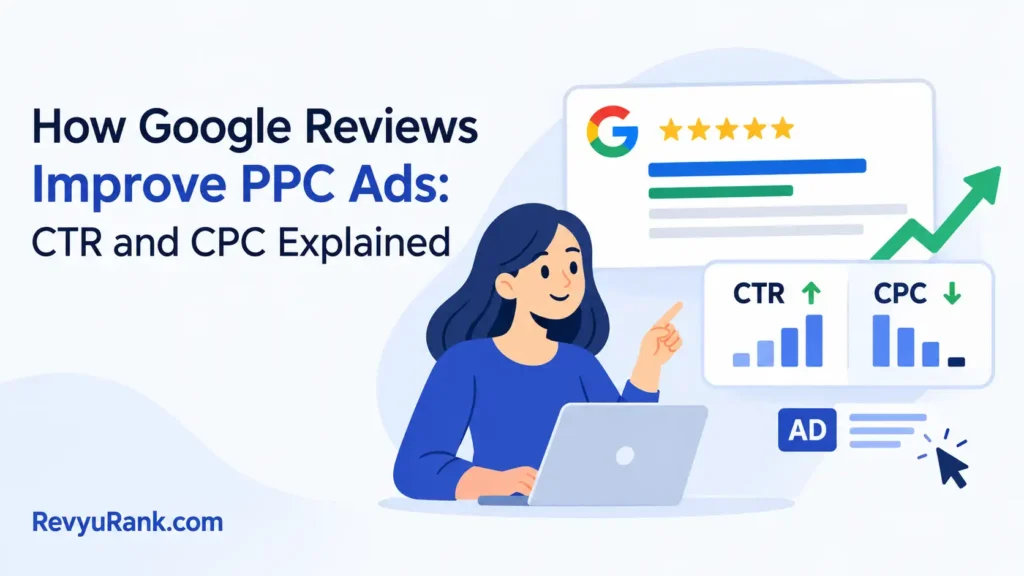
Google reviews improve PPC ads by adding star ratings that raise click-through rates and lower your cost per click. The exact benefit depends on whether you’ve collected enough feedback to trigger seller ratings in your campaigns. Without at least 100 verified reviews in the past year, the stars won’t appear at all. This is how those reviews help paid search campaigns — they turn plain text links into visual proof before a user even clicks.
How Google reviews improve your PPC ads
- Seller ratings add 1–5 gold stars below your ad headline when you hit the review threshold.
- You need at least 100 verified reviews from one country within the last 12 months.
- Your average rating must be 3.5 stars or higher for the extension to show.
- Stars typically increase click-through rates by about 10% to 15%, depending on your industry.
- Higher click-through rates push your Quality Score up, which lowers your actual cost per click.
- If you sell services instead of physical goods, third-party review platforms are usually required to gather enough volume.
Why star ratings lower PPC costs
Stars catch the eye faster than plain text. When a searcher scans a results page, the gold stars break up the wall of blue links and black copy. That visual contrast is what drives more clicks without raising your bid.
The mechanism behind this is Quality Score. Google Ads assigns every keyword a score from 1 to 10 based on expected click-through rate, ad relevance, and landing page experience. When seller ratings push more people to click, your expected click-through rate climbs. A higher expected rate lifts your overall Quality Score.
A better Quality Score means you pay less for the exact same ad position. You’re essentially rewarded for running an ad that searchers actually want to click. The auction math favors ads that satisfy users, so the stars directly shrink your cost per click over time.
Trust is the other half of the equation. Buyers hesitate when they don’t recognize a brand name. Seeing a 4.6-star rating from hundreds of customers removes that hesitation instantly. It acts as social proof baked right into the ad unit.
This doesn’t work if your product quality is poor. If your average rating sits below 3.5 stars, Google simply hides the extension. You can’t force the stars to appear with a low score. The system only rewards businesses that have genuinely satisfied their customers. Check your current standing inside the seller ratings report in your Google Ads account to see exactly where you stand today.
When seller ratings don’t help PPC
The standard path assumes you have enough volume and a high enough score. Several situations change the outcome entirely.
| Situation | What changes | What to do instead |
|---|---|---|
| Under 100 reviews | Stars won’t display | Focus on collecting more customer feedback first |
| Rating below 3.5 stars | Extension stays hidden | Fix product issues before spending on ads |
| B2B service business | Customers rarely leave reviews | Use approved third-party review partners |
| Brand new ad account | No historical data exists | Run manual review extensions temporarily |
| Highly regulated industry | Review collection is restricted | Rely on sitelinks and callout extensions |
| Low search volume keywords | Few impressions mean fewer clicks | Broaden match types to get enough visibility |
If you’re launching a brand-new store with zero sales history, waiting for organic reviews will stall your campaigns. In that case, manually adding review extensions or structured snippets keeps your ads competitive while you build real volume. Once you cross the 100-review mark, switch back to automated seller ratings.
Steps to connect reviews to PPC ads
-
Sign up with a Google-approved review partner like Trustpilot, Yotpo, or Shopper Approved. These platforms automatically sync your verified customer feedback with the seller ratings system, assuming you process enough orders to generate volume.
-
Send a review request email within 24 hours of delivery. Waiting longer drops response rates sharply. Include a direct link to the review form so the customer doesn’t have to search for it.
-
Track your total count weekly until you pass 100 verified reviews from a single country within the last 12 months. This is the hard minimum Google requires before any stars can appear in your auctions.
-
Log into your Google Ads account and navigate to “Ads & extensions.” Confirm that seller ratings are enabled at the account level. They’re usually turned on by default, but it’s worth checking if you’ve touched campaign settings recently.
-
Wait 4 to 6 weeks after hitting the threshold for the stars to start showing. The system needs time to verify the data and propagate it across all eligible auctions in your target regions.
-
Compare your click-through rate from the month before stars appeared against the current month. Filter by campaigns where the extension actually served. If the rate hasn’t moved, check whether your average rating is barely scraping the 3.5 minimum.
-
If your click-through rate stays flat despite having 4.5 stars and over 200 reviews, pause the extension and audit your ad copy. Sometimes a weak headline cancels out the trust signal entirely. Rewrite the primary text, relaunch, and measure again over two full weeks.
PPC mistakes that waste review data
-
Ignoring negative feedback. Leaving bad reviews unanswered drags your average below 3.5 stars, which completely disables the extension and erases any click-through gains you’d built up over previous months.
-
Using unapproved collection tools. Only reviews gathered through Google-approved partners count toward seller ratings. Building your own survey form generates zero ad benefits, no matter how many responses you collect.
-
Assuming stars fix bad copy. A 4.8 rating won’t save an irrelevant headline. If your ad text doesn’t match the search query, users still scroll past, and your Quality Score drops regardless of the gold stars sitting underneath.
-
Mixing countries too early. The 100-review threshold applies per country. Spreading 120 reviews across five different markets means none of them qualify, leaving every single campaign without visible ratings.
-
Forgetting mobile formatting. Stars take up vertical space on small screens. If your description lines are already long, the extension pushes important details below the fold, costing you attention from phone users who make up most traffic.
Frequently asked questions
How long does it take for review stars to show?
It takes 4 to 6 weeks after you hit 100 verified reviews in one country. The delay happens because the system has to validate the data and distribute it across eligible ad auctions. You can’t speed this up by contacting support. Just keep collecting feedback while you wait.
Can I buy fake reviews to get stars faster?
No, and trying will likely get your ad account suspended. The seller ratings system only accepts feedback from approved third-party partners who verify actual purchases. Fake reviews fail these checks instantly. Stick to emailing real buyers after delivery.
Why aren’t my stars showing even with 200 reviews?
Your average rating might be below 3.5 stars, which hides the extension automatically. Another reason is spreading those 200 reviews across multiple countries without hitting 100 in any single one. Check both your score and geographic breakdown inside your Ads dashboard.
Is it safe to use third-party review platforms?
Yes, as long as you pick one from the official approved list. These companies follow strict data handling rules to verify purchases. Using an unlisted platform won’t harm your site, but those reviews simply won’t feed into your seller ratings.
What happens if my rating drops below 3.5 stars?
The star extension stops appearing immediately. Your ads revert to plain text, and you lose the click-through advantage you had built. To get them back, you’ll need to collect enough fresh positive reviews to pull the average back above the threshold.
Does this work for local service ads?
Local Services Ads use a separate verification and review system tied to your business profile rather than third-party sellers. Standard e-commerce seller ratings don’t apply there. Check the specific requirements for Local Services inside your business dashboard.
How many reviews do I really need each year?
You need at least 100 verified reviews from a single country within a rolling 12-month window. Older reviews drop off after a year. If you stop collecting, your count shrinks daily until you fall below the threshold and lose the stars.
Do competitor reviews affect my ad stars?
They don’t touch your rating, but they change how your ad looks next to theirs. If a competitor has 4.8 stars and you have 3.6, searchers naturally click their ad. Your absolute score matters less than how you compare on the actual results page.
Conclusion
The stars only hold their value when the rest of your campaign matches the promise they make. Keep your landing pages fast, your product descriptions honest, and your review requests timed to the moment a customer feels most satisfied. That alignment is what turns a small visual badge into a lasting drop in acquisition costs.

Robert Miller works as a Reputation Management Consultant. He has been helping U.S. businesses for over ten years. His work involves helping people protect and enhance their online image.Robert has worked with a wide range of companies. He has helped new businesses, local places that give a service, and big companies. He helps turn customer reviews into something that helps people trust their company and drives business growth.