A reliable way to get video reviews is to ask satisfied customers at the right moment, give them simple prompts, and make recording easy. Ask after a clear success, such as a delivered result or a solved problem. Use a short request, a private upload link, and permission to publish before you share the video.
Your response rate will change with customer trust, the effort required, and the channel you use. The type of customer also matters: a business buyer may need approval, while a consumer may record within minutes. You’ll get better results by matching the request to each situation instead of sending one message to everyone.
Who video reviews are for
Video review requests work best for businesses that already have customers with a clear result to describe. A local service provider may need short clips about the experience, while a software company may want a screen recording with the customer’s voice. Each needs a different prompt and approval process.
A small business owner often has happy customers but no review system. That reader needs a repeatable request, a safe way to collect files, and wording that doesn’t sound demanding. The goal isn’t to make every customer appear on camera. It’s to make the right customer feel comfortable saying yes.
A marketing manager may already use email software, customer relationship management tools, or a review platform. That reader needs better timing, stronger questions, and a process for checking usage rights before publishing. A creator or freelancer may instead need a direct message script and a simple mobile upload option.
This page serves businesses seeking voluntary customer videos, not people trying to create fake testimonials or pay for misleading praise. It assumes you already have real customers and can contact them lawfully under your email, text, and privacy rules.
What affects response rates
The customer’s recent result matters most. Ask soon after the person has praised the work, completed a successful onboarding step, renewed a service, or reported a useful outcome. Read the latest support message, survey answer, or order note first. If there’s no clear positive moment, ask for feedback before asking for a public review.
The recording effort changes the answer sharply. A request for a 30- to 60-second phone video is easier than a request for a polished interview, script, lighting setup, or edited file. If the customer needs equipment or a quiet studio, offer a live interview instead. The trade-off is simple: easier recording usually means less control over sound and framing.
Trust affects both acceptance and honesty. Tell people where the video may appear, whether you’ll edit it, and whether you’ll attach their name, job title, or company. If you hide those details, a customer may agree first and withdraw permission later.
The request channel also matters. Email gives space for context and a clear consent record. A direct message may feel more personal, but it’s harder to manage files and approvals. Use the channel where the customer already responds, then move the video and permission record into one organized folder.
The mistake that costs businesses the most is asking for praise instead of an honest account. “Tell us how great we are” produces stiff answers, weakens trust, and may leave you with a video that sounds like an advertisement. Ask about the problem, the change, and the practical detail the customer noticed.
How to request video reviews
-
Choose one customer with a clear positive result. Check a recent message, completed project, repeat order, renewal, or survey response. If you can’t name the result in one sentence, choose another customer before sending the request.
-
Ask for a 30- to 60-second video. State the target in seconds, not “a quick video.” Tell the customer that a phone recording is acceptable and that they don’t need special lighting, editing, or a script.
-
Give three prompts. Ask, “What problem were you trying to solve?”, “What changed after using us?”, and “What would you tell someone considering us?” Three prompts give structure without forcing exact words.
-
Explain where the video may appear. Name the website, product page, email campaign, social account, or sales presentation you have in mind. Say whether the customer’s name, photo, company, or job title will appear.
-
Ask for clear permission before publishing. Use a short written release that covers recording, editing, publication channels, name use, and withdrawal terms. If your business handles minors, health details, employee data, or regulated claims, ask a qualified lawyer to prepare the form.
-
Send one simple recording method. Use a secure upload form, a business email address, or the review platform you already manage. Test the method yourself and check that it accepts the expected file type before inviting customers.
-
Set a reasonable response window. Give the customer 7 days to reply, then send one polite reminder. The request should remain useful if the person says no, so don’t imply that service depends on participation.
-
Check the file before publishing. Confirm that the sound is understandable, the customer is the right person, and the content matches the permission given. Ask for approval after any edit that changes meaning or removes important context.
-
Record the source and consent. Save the customer’s name, request date, permission, file location, approved wording, and publication channels in one record. The sign that this step worked is that another team member can verify the video without asking you to remember details.
The key judgment is whether the video still represents the customer’s own experience after editing. If an edit makes a result sound broader, faster, cheaper, or more certain than the customer said, leave it out or ask for fresh approval.
Video review situations compared
The best request depends on the customer’s comfort, the result you need, and the time available. Use the simplest format that still gives viewers useful proof.
| Situation | What to do | What it takes | What to watch for |
|---|---|---|---|
| Happy local customer | Ask after service | One short recording | Background privacy |
| Busy business buyer | Offer guided interview | Scheduled call | Company approval |
| Strong written praise | Convert with prompts | Extra follow-up | Natural wording |
| Complex product result | Request screen recording | Clear instructions | Private data |
| Shy customer | Offer audio or text | Less production effort | Publication permission |
| Repeat customer | Ask after renewal | Existing trust | Overuse of one voice |
Details that improve video quality
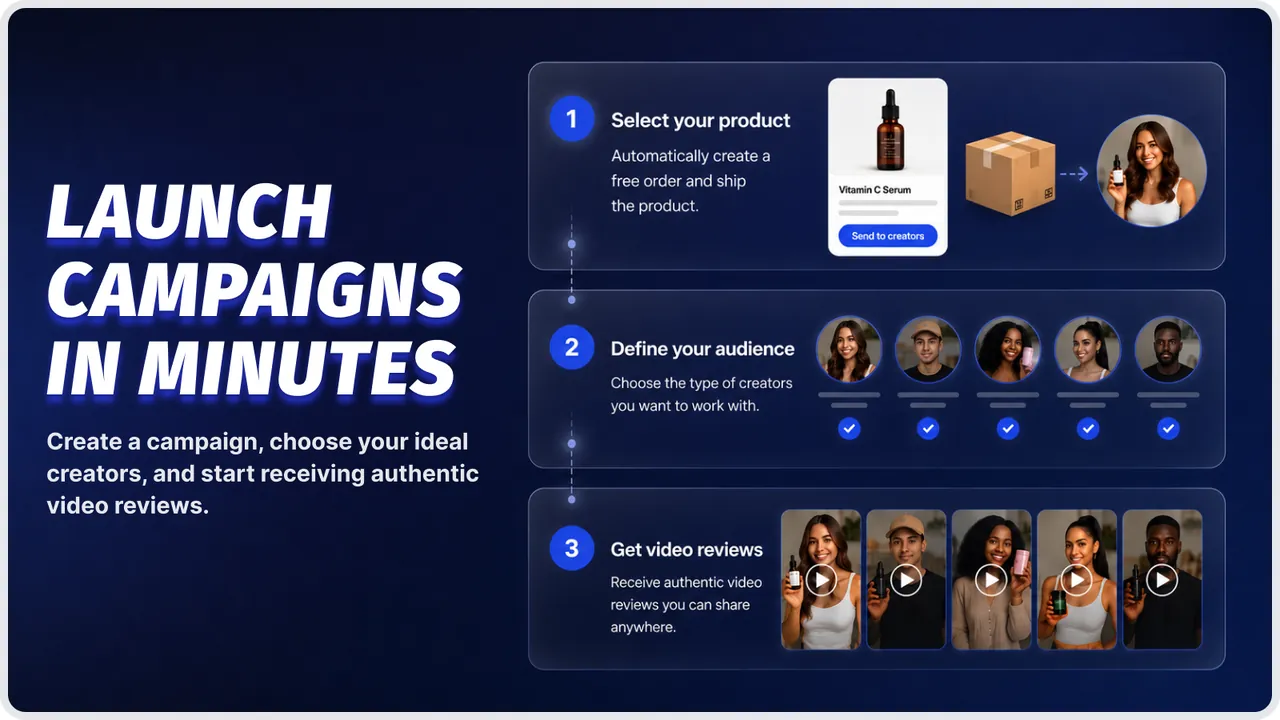
Prepare the customer first
Experienced marketers don’t send a blank request. They explain the target length, recording options, prompts, publication plan, and permission terms in the same message. The customer can then decide with enough information, instead of agreeing and discovering the conditions later.
Ask the customer to choose a quiet place and face a window or lamp if possible. Don’t demand a perfect background. A real setting can add useful context, but remove visible addresses, documents, screens, children, or other people who haven’t agreed to appear.
If you’re interviewing live, send the questions before the call. Keep the opening warm and let the customer use their own words. If they make a claim you can’t verify, ask them to describe what they personally saw rather than prompting a stronger statement.
Check the message, not just the picture
A clear face with poor audio is still a poor review. Listen for traffic, fans, echo, interruptions, and clipped words before you publish. If the first sentence is hard to hear, ask for a new recording or use a professional interview setup.
Good editing removes pauses and repeated words without changing the meaning. Keep the customer’s answer in the same order and don’t join separate sentences to create a claim they didn’t make. You can add captions for access, but check every name, number, and product term.
Leave unsupported superlatives alone. “The best,” “guaranteed,” “risk-free,” and similar claims may create advertising or compliance problems. If your customer says one, ask whether they can replace it with a specific observation, or remove that line with approval.
Video review problems and fixes
A visible problem usually has a practical first check. Don’t publish a weak file just because getting a customer on camera took effort.
| What you notice | What it usually means | What to do first | How to stop it happening again |
|---|---|---|---|
| No reply | Request feels effortful | Shorten the ask | Use three prompts |
| Dark face | Light sits behind subject | Face a window | Add lighting guidance |
| Hard-to-hear voice | Background noise | Request quiet retake | Test audio first |
| Stiff answers | Script feels forced | Use open prompts | Avoid written copy |
| Private data visible | Recording shows screen | Pause publication | Give background examples |
| Claim sounds exaggerated | Editing changed meaning | Restore original wording | Approve final cut |
Rules for customer testimonials
The Federal Trade Commission says endorsements must reflect the endorser’s honest opinion, findings, beliefs, or experience. If a relationship could affect how viewers judge the endorsement, disclose it clearly and place the disclosure where viewers can see it; review the FTC endorsement guides for current examples.
A free product, discount, payment, affiliate relationship, employee connection, or contest entry may affect how people read a review. Don’t assume that a customer’s permission removes the need for disclosure. Ask your legal adviser how the rule applies to your offer, audience, and publication channel.
Rules can also change by country, state, platform, industry, and customer type. A health, finance, employment, children’s, or regulated-product testimonial needs extra care. Check the regulator that covers your market and the platform’s current advertising rules before publication.
Don’t ask customers to make claims you can’t support. If a video includes personal information, another person’s voice, a home address, medical details, or confidential business data, stop and get permission or remove the material. If the situation involves legal risk, send it to a qualified lawyer instead of guessing.
The real cost of video reviews
The money cost may be low if customers use their phones, but the work cost is not. Someone must choose customers, write requests, send reminders, check permission, download files, review sound, edit the video, add captions, and store the final version.
A simple customer clip usually needs less production time than a filmed interview, but it gives you less control over framing and audio. A professional shoot costs more in planning and equipment, yet it may suit a homepage, campaign, or executive audience. Choose based on where the video will be used, not on appearance alone.
Your internal cost rises when the request is vague. If customers ask what to say, where to upload, or whether their name will appear, each question creates another delay. Put those answers in the first message and compare the time saved against any recording tool or editing service fee.
Prices for recording platforms, captioning, editing, and storage change by provider, plan, file size, and region. Check the current pricing and data terms on the exact service page before budgeting. If the video is only for a sales call, a secure business email may be enough.
Keeping video reviews usable
Store the original file, the edited file, the permission record, and the approved transcript together. Use a file name that includes the customer, date, and version, but don’t put sensitive information in a shared filename. Limit access to the people who need it.
Check the video whenever the product, price, promise, or customer relationship changes. A review that was accurate last year may become misleading after a major feature change. If the customer asks for removal, pause the video while you check the permission terms and your legal duties.
Keep a simple record of every place the video appears. That record helps you find copies in landing pages, sales decks, ads, social posts, and email campaigns. If the customer approves one channel only, don’t quietly move the file to another.
A video needs attention when its claim no longer matches the current offer, its permission record is missing, or its file can’t be opened and checked. Fix it by replacing the file, confirming permission, or removing it; don’t start by editing around the problem.
When video reviews are the wrong choice
Video is the wrong choice for a customer who wants privacy, works under strict confidentiality, or can’t safely reveal the relationship. If a face, voice, workplace, or project detail could identify them, use an anonymous written review, a permitted case study, or no public testimonial instead.
It’s also a poor choice when viewers need to inspect complex data. A face-to-camera clip can’t carry evidence requiring definitions, comparisons, or limitations. Use a documented case study with approved figures, methodology, and context. If those details can’t be shared, don’t imply the video proves more than it does.
Don’t use this approach when you need guaranteed volume by a deadline. Customer participation is voluntary, so a promising list may produce too few participants or none who meet the brief. If you need a set number of interviews on schedule, use a paid professional interview or controlled research project.
If you need legal wording, regulated claims, or consent from a minor, stop before recording and use a qualified lawyer or approved research provider. Agree where footage will appear and whether the customer can withdraw. If those terms are unresolved, choose a written or private format.
Frequently asked questions
Can I pay customers for video reviews?
Yes, but disclose the payment or other benefit clearly. The customer must still give an honest opinion based on real experience. Don’t pay only for positive comments or tell the person what result to claim. Check the rules for your country, industry, and platform before publishing the video.
Why do customers ignore video review requests?
Customers often ignore requests that require too much effort or leave basic questions unanswered. State the target length, give three prompts, explain where the video will appear, and provide one recording method. If there’s no recent positive result, ask for feedback first instead of a testimonial.
How long should a customer video review be?
Aim for 30 to 60 seconds when the video is for a product page, email, or social post. A complex business result may need a longer interview, but viewers still need a clear problem, change, and practical detail.
Is it safe to publish a customer’s face and name?
Only after you’ve received clear permission covering those uses. Check the background for addresses, documents, screens, children, and other people. If the video includes health, financial, workplace, or confidential information, get specialist legal advice before publication rather than relying on a general release.
What happens if a customer withdraws permission?
Pause publication and check the written terms. Remove active copies where your agreement or law requires it, then record what you removed and when. Don’t argue that the video is valuable. If the request affects a contract, privacy right, or regulated claim, ask a lawyer.
Does it matter where I ask for the review?
Yes. Ask in the channel where the customer already responds, but keep the final file and permission record in a controlled business system. Email gives more space for details; direct messages may feel personal but can make approval and file tracking harder.
How many prompts should I give customers?
Give three prompts for a short recording. Ask about the original problem, the change after using the product or service, and what they’d tell someone considering it. More questions can make the video feel like an interview, while fewer may leave the customer unsure what to say.
Start getting video reviews
First, choose one customer with a recent, specific result and ask for a 30- to 60-second phone video. Give them three prompts: what problem were you trying to solve, what changed, and what would you tell someone considering it? Ask for a natural answer in their own words, not a script or promise that exceeds their experience.
Before recording, explain where the clip will appear, whether you may edit it, and whether you may use the customer’s name, title, company, or likeness. Get written permission. Have them record somewhere quiet with clear audio, then send the original file. Review the wording before posting. If it includes regulated claims, private data, another person, or unclear consent, don’t publish it; pause and get legal help.

Robert Miller works as a Reputation Management Consultant. He has been helping U.S. businesses for over ten years. His work involves helping people protect and enhance their online image.Robert has worked with a wide range of companies. He has helped new businesses, local places that give a service, and big companies. He helps turn customer reviews into something that helps people trust their company and drives business growth.