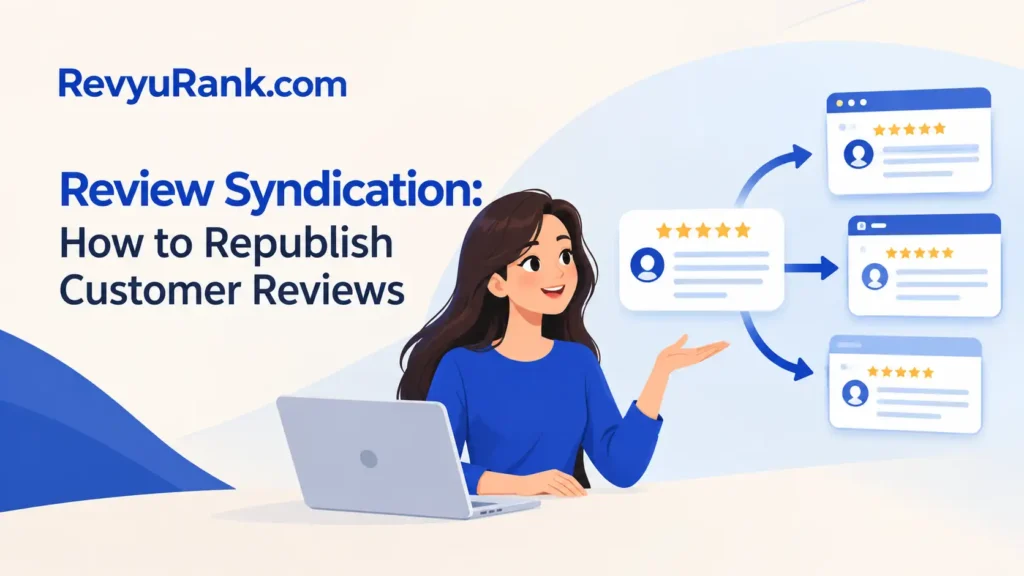
Review syndication means republishing customer reviews, ratings, or review snippets from one approved source across other channels. It can save time and keep messages consistent, but only when the original review is real, permission is clear, and the wording isn’t changed to mislead readers. Use the source, preserve important context, and show where the review came from.
The result changes with the source platform, the channel receiving the review, and the type of editing you do. A website widget, an email campaign, a product page, and a paid advertisement don’t carry the same risks. Your country, industry, and platform terms also matter.
Who needs review syndication

A small business owner may have genuine reviews on Google Business Profile, Yelp, Trustpilot, Amazon, or a booking platform. They usually want those reviews on their own website or in sales material without asking each customer to write the same review again.
A marketing manager has a different problem. The team may need approved review content for landing pages, email campaigns, social posts, sales presentations, or paid ads. That person needs a repeatable approval process, a record of the original source, and a way to remove outdated content quickly.
A software or ecommerce team may already use an integration or review platform. It needs to know whether the feed copies the full review, the rating, the customer name, the date, and the response. It also needs to know whether the source allows that use and whether the display can be audited.
This page serves businesses that already have authentic customer feedback and want to reuse it across their own marketing channels. It assumes you can access the original review and contact the business account owner or platform support team when permission is unclear.
It isn’t the best guide for creating fake reviews, buying testimonials, or copying reviews from competitors. Those practices need to stop, not scale. If you need a legal answer for a regulated product, ask a qualified attorney in the country where the promotion will appear.
What changes the result
The original source matters most. A review you collected directly may have different reuse terms from a review posted on a marketplace or third-party platform. Read the source’s current terms, API rules, export settings, and business agreement before copying anything. A screenshot alone doesn’t prove that reuse is allowed.
The destination changes the level of care. A review on your product page is different from a review used beside a price in a paid ad. Ads can reach people who never saw the original context, so the claim must remain accurate and representative. If the destination is regulated, check the applicable advertising rules before publication.
The amount of editing also changes the risk. Correcting a spelling error may be harmless, but removing a sentence that limits the customer’s praise can change the meaning. If you shorten a review, keep the key qualification and mark the text as edited when a reader could reasonably think it’s complete.
The reviewer’s identity needs a separate check. A first name and last initial may protect privacy better than a full name, but a photo, job title, location, or exact purchase can still identify someone. Use only the details you have permission to display, and don’t add a role or result the customer never provided.
The most commonly missed factor is timing. A review may have been accurate when posted but become outdated after a product change, a price change, a service failure, or a resolved complaint. Compare the review date with the current offer, and add a date or remove the review when its claim no longer fits.
Finally, check whether the review represents the wider customer experience. A page that displays only unusually positive comments can create a misleading impression, even when every selected review is genuine. Keep a record of the selection method, the source URL or review ID, the date collected, and any changes made.
How to syndicate reviews
Start with reviews you have a clear right to reuse. Put them in a working sheet with the original platform, review ID or URL, customer name as displayed, date, rating, full wording, and the proposed destination. Don’t begin by copying reviews into several channels.
-
List each destination channel. Write the exact places you plan to publish, such as a website, email, sales deck, social post, or paid ad. Mark whether each channel is public, targeted, or paid. The list is complete when every planned placement has a named owner.
-
Check the source permission. Read the source platform’s current business terms and export rules, then review any permission given by the customer. Save the relevant page, agreement, or consent record with the review. If you can’t show why reuse is allowed, hold that review back.
-
Capture the original review. Copy the full wording, rating, date, visible author details, and source reference into your record. Keep the original version unchanged. A source record lets you compare the published version later if a customer, platform, or regulator asks questions.
-
Check the claim against the current offer. Match every factual statement with the product, service, price, location, and time period it describes. If the review mentions a feature you no longer provide, don’t publish it beside the current offer unless the difference is made clear.
-
Choose the smallest useful edit. Keep the review complete where possible. If you shorten it, use an ellipsis only where the meaning stays intact, preserve material limits, and label the excerpt as shortened or edited when that change could matter to a reader.
-
Confirm the identity display. Use the name, image, company, location, or job title only as permitted. If the customer asked for removal or a less identifying display, follow that request before publication. The published identity should match your record.
-
Add source context. Show the platform name, rating scale where needed, review date, and a link or path to the original when the channel allows it. For a small ad, retain enough context in the ad or its landing page to avoid a false impression.
-
Get final approval. Have a reviewer compare the draft with the stored original and check the destination’s rules. Approval is complete when the reviewer records the date, channel, version, and reason for any edit.
-
Publish and test the display. Open the live page on a phone and desktop, and check the review text, rating, name, date, and source label. The step worked when the content is readable, and no truncation changes the meaning.
-
Record removal and update triggers. Note who can remove the review and what event starts a check, such as a customer request, product change, source deletion, or complaint. If you can’t remove the content quickly, don’t place it in a channel you can’t control.
The key judgment is whether the published excerpt still gives a reasonable reader the same impression as the original. If the shortened version sounds stronger, broader, or more certain, publish the full review or leave it out. Legal interpretation, platform disputes, and privacy complaints should go to an attorney or the platform’s support team rather than an improvised edit.
Review reuse cases compared
The right method depends on the source, destination, and amount of context available. A controlled website display is usually easier to update than a printed brochure or a paid ad. The more permanent or regulated the placement, the more valuable a manually approved version becomes.
| Situation | What to do in it | What it takes | What to watch for |
|---|---|---|---|
| Website review widget | Use approved live feed | Setup and monitoring | Feed may change |
| Product page excerpt | Keep full context | Manual review | Claims may age |
| Email campaign | Use short attributed quote | Campaign approval | Audience sees less context |
| Paid advertisement | Use cautious exact wording | Legal and ad review | Selection can mislead |
| Sales presentation | Keep source and date | Version control | Slides get reused |
| Print brochure | Use dated approved text | Reprint effort | Removal is difficult |
| Social media post | Link source | Fast approval | Comments add context |
A live feed can reduce manual work, but it may also import a new rating, response, or deleted review without the same approval check. A manual process takes more effort, yet it gives you stronger control over wording and timing.
If the material includes pricing, performance claims, safety statements, or customer testimonials, use the approved manual version unless the feed itself has been cleared for that use. A review that’s acceptable on a product page may need different wording in an advertisement.
Keep the source URL, capture date, and approval record with every manual excerpt. Otherwise, a sales slide or brochure can keep circulating after the original review changes or disappears. If speed matters more than fixed wording, use a live feed; if the wording must remain unchanged, use a dated copy.
Details that improve syndicated reviews
Preserve the original meaning
The safest preparation starts with the full review, not the sentence that sounds best. Copy the complete text into your record, then mark the exact words proposed for publication. Compare the excerpt with the full version after editing, not before.
Check the words around the praise. “The support team fixed my issue after I sent the requested logs” is different from “the support team fixed my issue.” The second version may remove a condition that helps the reader judge the result.
Keep the original rating scale visible when it could confuse people. A 4-star review on one platform may not mean the same thing as a 4-star review on another. If you combine sources, name each source instead of presenting different scales as one measurement.
Date-sensitive claims need special care. A review that praises a feature, delivery speed, staff member, or location should be checked against the current service. If the detail changed, add clear date context or choose a review that still describes the present offer.
Control the publication record
Use one record for each review, with a version number for every approved edit. Record the source, destination, approval date, editor, customer display name, and removal status. This makes it easier to find every placement when a review must come down.
Set a simple approval order: source check, permission check, meaning check, identity check, destination check, then publication. Don’t approve the wording first and search for permission later. That order creates pressure to keep content that should have been rejected.
Leave negative information alone when it gives useful context. Don’t hide a complaint response, replace a low rating with a higher one, or select only part of a sentence to make the result sound universal. A real review can still be useful without sounding perfect.
Use a separate field for internal notes. Don’t place private customer details, complaint history, order numbers, or support messages in the public copy. A review record should help your team verify the content without exposing information the customer never agreed to publish.
Fixing Review Syndication Problems
Small changes can create a large difference in meaning. Match what you see with the first safe action, then keep a record of the correction.
| What you notice | What it usually means | What to do first | How to stop it happening again |
|---|---|---|---|
| Rating changed unexpectedly | Source feed updated | Compare the source | Store displayed dates |
| Quote sounds stronger | Context was removed | Restore full wording | Require meaning checks |
| Customer wants removal | Consent or preference changed | Unpublish promptly | Track removal requests |
| Review shows old feature | Offer has changed | Add date context | Review claims before campaigns |
| Name appears incorrectly | Identity field changed | Correct display details | Lock approved identity |
| Source link no longer works | Review was moved | Save source record | Store review IDs too |
| Duplicate review appears | Channels use one feed | Remove repeated copy | Assign channel ownership |
A common operational mistake is to approve a short quote without keeping the full review beside it. That can cost the team time during a complaint, because nobody can tell whether the published words were cut fairly. Store the original and the approved excerpt together.
If a feed displays content you can’t verify, pause the feed rather than editing around the problem. Ask the platform or integration provider for the source record. A technical issue becomes a compliance issue when your team keeps publishing content it can’t explain.
Rules for republished reviews
The Federal Trade Commission says endorsements must be honest and not misleading, and material connections between an endorser and a business may need clear disclosure. The FTC’s Endorsement Guides explain the U.S. rule and examples. Apply the version relevant to your promotion, not a copied summary from another site.
The FTC also addresses review practices directly. A business shouldn’t create, buy, or publish fake reviews, and it shouldn’t use selective presentation to give a misleading picture of customer opinion. The exact duty can depend on the facts, the audience, the product, and whether the placement is advertising.
Platform terms add another layer. Google, Yelp, Trustpilot, Amazon, app stores, booking sites, and social networks can set different rules for exporting, displaying, or modifying reviews. Check the current terms and developer documentation for the specific account and country you use.
Privacy rules can also apply. A customer name, photo, job title, location, or purchase detail may identify a person. If the publication involves personal data, ask your privacy lead or attorney to check the relevant U.S. state law or other local law.
Stop and get qualified legal advice if the review supports a health, financial, employment, housing, safety, or other regulated claim. Don’t publish a risky testimonial first and plan to fix it later. The person handling the legal review should also check the final channel and audience.
The real cost of syndication
The direct cost may be a software subscription, an integration fee, staff time, legal review, or creative work. Prices change by provider, number of locations, number of sources, and required features, so compare the current pricing page, contract, and renewal terms instead of using a general market figure.
Manual copying costs time each time a review changes. It may still be the better choice when you have a small number of reviews, need careful editing, or publish into channels that don’t support a reliable feed. The trade-off is control versus speed.
An automated feed can lower repeated work, but it can import changes without a fresh human review. Before choosing one, ask whether it keeps the source ID, records edit history, supports removal, shows the review date, and lets you pause publication. A low setup effort isn’t useful if the audit trail is missing.
Legal and reputation risk is harder to price. A misleading excerpt can lead to a correction request, platform action, customer complaint, lost trust, or legal review. Compare those risks with the value of using the review, especially when the same claim will appear in a paid campaign.
To estimate your own effort, count the reviews, destinations, approval stages, and update events in one campaign. More destinations mean more places to check when one source changes. A small pilot with a removal test can show whether the process works before you connect every channel.
Keeping reviews accurate
Keep the original review, source reference, permission record, approved copy, and live destination together. Record when the review was collected and approved, along with the exact wording and rating used. Don’t rely on a screenshot as your only record, because it may not show the terms, date, source ID, or later changes.
Check every known destination when a source review is edited, removed, disputed, or replaced, not just the page where it was first published. Also check when the product, service, feature, location, or offer described by the review changes. Those events matter more than an invented calendar interval.
A review needs attention when its source disappears, its rating changes, its author asks for removal, or the claim no longer matches the current offer. If only the surrounding offer changed, update the context or replace the review rather than altering the customer’s words. Remove it when the source or permission can’t support continued use.
Track each removal in a register that lists the review ID, every known destination, the person responsible, the completion date, the reason for removal, and any replacement review. After removal, search the public site, campaign system, social account, and sales files for remaining copies.
Printed material and downloaded presentations may need a separate response, because deleting the online source won’t recall copies already distributed. Tell the teams that control those files which version is no longer approved.
If the feed or integration can’t identify where a review appears, pause new publication and ask the provider for an export or audit report. You don’t need to rebuild the whole process, but you do need a reliable record before continuing. Resume only after the review can be traced from source to each live destination.
When Review Syndication Goes Wrong

This approach isn’t right when you don’t have permission to reuse source content. Check the platform’s terms, the customer’s consent, and any licence covering the review. Ask the platform or customer for permission, and keep approval with the source record. If permission can’t be confirmed, don’t copy the review and hope attribution solves the problem. Collect feedback through lawful consent instead.
It also isn’t right when a changed product or service makes the review no longer describe the current offer. Compare it with the version or terms the customer experienced. Use current feedback, add context, or remove the old review. If retained, show its date and identify the change nearby. A dated review shouldn’t prove a present feature without explanation.
Skip automated reuse when your team can’t monitor changes or remove content quickly. Assign a named reviewer, set a check schedule suited to the risk, and test removal before publication. If no one can take responsibility, use a small manual selection with a source record showing when it was checked. The page can’t cover legal or technical work needed for a high-risk claim, so regulated promotions should go to qualified counsel or the responsible compliance team.
Finally, this isn’t a method for hiding criticism. If the business needs to answer a complaint, publish a clear response through the original platform and follow its rules. Preserve the customer’s wording and rating; respond separately rather than editing the review. Don’t remove unfavorable content unless the platform’s rules permit removal, such as for a genuine policy violation.
Frequently asked questions
Can I copy reviews from another website?
Usually, not without checking permission first. The source site’s terms, the reviewer’s rights, your business agreement, and the destination channel can all matter. Attribution may help readers understand the source, but it doesn’t automatically grant reuse permission. If the platform doesn’t clearly allow copying, use an approved widget, ask the platform, or collect fresh feedback instead.
Why did my syndicated reviews disappear?
They may have been deleted, edited, hidden, or moved at the source. A feed can also fail because an access token expired, an account changed, or the destination rejected the content. Compare the live source with your stored review ID, then check the integration status. Don’t replace missing text with an unverified copy.
How long should a syndicated review stay live?
There’s no single safe number of days. Keep it live while the source, permission, identity display, and described offer remain accurate. Recheck it when the customer asks for removal, the source changes, or the product changes. A review about a discontinued feature should be removed or clearly dated rather than left on an automatic schedule.
Is it safe to edit a customer review?
Minor corrections may be acceptable, but editing can change the customer’s meaning. Keep the full original, remove only what you can justify, and mark a shortened excerpt when the missing words affect context. Don’t add claims, remove important conditions, change the rating, or combine separate reviews into one statement.
What happens if a customer withdraws permission?
Take the review out of controlled placements promptly and record the request. Search the website, campaigns, social posts, sales files, and active feeds for copies. Ask the source platform about its own removal process, because your business may not control the original page. Get privacy or legal advice when the request involves personal data or a dispute.
Does it matter where the review came from?
Yes. A review from a marketplace, regulated platform, direct survey, or public social page may have different reuse terms and context. Record the source, date, rating scale, and permission path for every item. If readers could mistake one platform’s review for another’s, name the source clearly beside the published content.
Start with one review source
First, choose a small set of genuine reviews and record each source, permission, full wording, reviewer identity as displayed, rating, date, and intended destination before publishing. Keep a copy of the source page or other evidence showing what was approved. If you use an excerpt, preserve its meaning and mark any omission rather than silently stitching sentences together.
Before publication, compare the review with the approved record, then schedule a post-publication check for formatting changes. Confirm permission covers the intended use, not advertising use of the writer’s name, photograph, or words. If permission is unclear, a regulated claim is involved, identity can’t be verified, or copies can’t be removed, pause and escalate.

Robert Miller works as a Reputation Management Consultant. He has been helping U.S. businesses for over ten years. His work involves helping people protect and enhance their online image.Robert has worked with a wide range of companies. He has helped new businesses, local places that give a service, and big companies. He helps turn customer reviews into something that helps people trust their company and drives business growth.