
Want to build instant trust and dominate local search results? Learning how to get Google reviews is the single most effective way to boost your Business Profile, outrank competitors, and convert searchers into paying customers.
In today’s digital market, over 90% of consumers read online reviews before choosing a local business. High ratings and a consistent stream of positive feedback not only signal quality to potential buyers, but they also serve as a crucial ranking factor for Google’s local algorithm.
Whether you are launching a new brand or scaling an established local company, this guide breaks down proven, step-by-step strategies to collect real Google reviews fast, optimize your profile, and handle customer feedback effectively without violating Google’s guidelines.
Actionable Ways to Get Google Reviews and Boost Your Business Profile
Getting more Google reviews is not about luck. It comes from a simple system that makes it easy for satisfied customers to share their experience. When your Google Business Profile is set up well, and your requests are timely, online reviews become easier to earn.
That matters for local seo. Positive reviews can improve visibility, build trust, and help more people choose your business. The steps below focus on practical ways to ask, share, follow up, and manage feedback without making the process hard for customers.
1. Claim and Optimize Your Google Business Profile
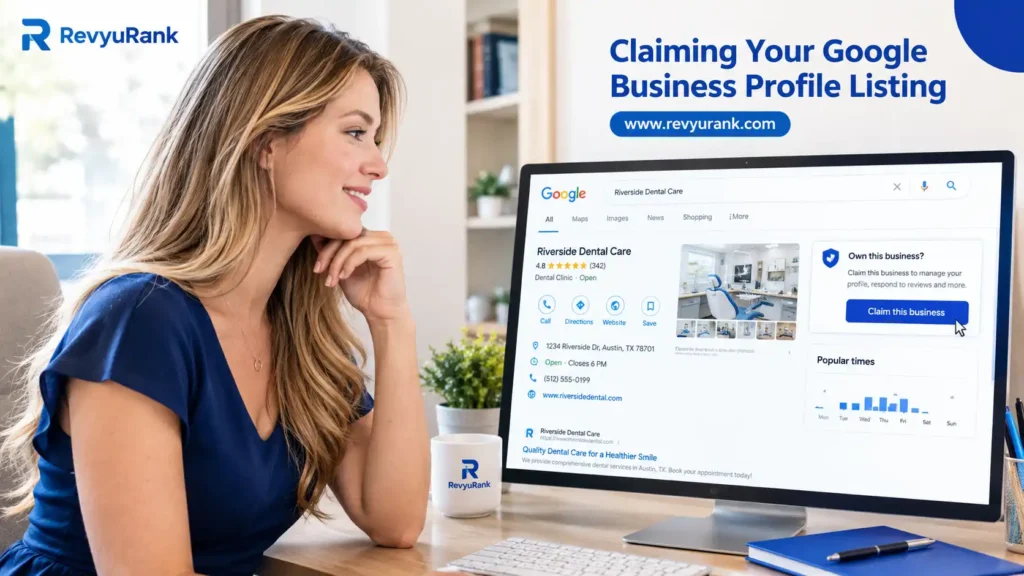
Start by claiming or adding your listing through Google. If your company already appears, sign in and claim it. If not, create it. This is the first step if you are asking, “How do I set up a Google Business Profile to start getting reviews?” Without a verified profile, customers cannot easily leave feedback.
Next, complete verification using the method Google offers, such as phone, text, email, or video. Once approved, review every part of the profile. Make sure your business name, address, contact details, and hours are accurate so customers see relevant information in search results.
Finally, strengthen the page with photos, service details, and a clear description. A polished Google Business Profile, once called Google My Business, builds trust before people even visit. Better information supports stronger visibility and gives customers confidence to leave reviews after a good experience.
2. Create a Direct Google Review Link for Customers
Once your profile is verified, create a Google review link that sends customers straight to the review page. This saves time and removes confusion. Instead of asking people to search for your listing, you give them a direct link to the exact place where they can post feedback.
You can find it inside your profile area, where Google lets you manage reviews and get more reviews. After that, consider turning it into a short link so it looks cleaner and is easier to share in messages or print.
- Open your Google Business dashboard and find the option to get more reviews.
- Copy the direct link to your Google reviews page.
- Use a short link version so customers can remember and trust it more easily.
A simple path gets better results. If people can reach the review page in one tap, they are more likely to follow through.

3. Generate a QR Code for Easy Review Access
A QR code makes your Google review link even easier to use. Customers can scan it with a phone and land on your review page right away. This is helpful in stores, offices, or at events where people may be ready to leave feedback on the spot.
Creating one is simple. You only need your review URL and a QR code generator. After that, place the code anywhere customers naturally pause, such as checkout counters or printed handouts. This reduces steps and supports more Google business reviews from real customers.
- Add the QR code to signs in your storefront or waiting area.
- Print it on flyers, handouts, or business cards.
- Pair it with a short message asking for Google reviews after a good visit.
When the process feels effortless, response rates improve. A quick scan is often easier than typing out a full web address.

4. Ask for Reviews at the Right Moment
Timing can make or break your review requests. The best moment is right after a strong customer experience, when the interaction is still fresh. If someone just completed a purchase, thanked your staff, or referred a friend, they may already be in the right mindset to leave positive reviews.
Before asking, check how the person feels. A quick question about their visit helps you spot issues early and handle them privately. Satisfied customers are far more likely to respond when they feel heard first, not pushed.
- Ask after a purchase or completed service.
- Ask when a customer shares appreciation or says they had a great experience.
- Ask during a thank-you message or follow-up conversation.
Want a practical example? Try: “We’re glad you had a great experience. If you have a moment, would you share it on Google?” It is simple, clear, and respectful.
5. Use Email and SMS to Request Google Reviews
Email and SMS are two of the easiest ways to send review requests at scale. They work well after an appointment, delivery, or completed job because customers can respond when it suits them. A short message with a direct link keeps the review process simple and encourages faster action.
Personalization helps here. Mention the customer’s name or recent visit so the request feels genuine, not mass-produced. You can also add your review link to your email signature, which creates another soft reminder every time you communicate.
- Send a brief text message thanking the customer and linking to your review page.
- Use a follow-up email after service with one clear request.
- Add the review link to your email signature for ongoing visibility.
Yes, there are ways to automate these asks. Automated email or SMS sequences can trigger after a purchase so you never miss a good moment.
6. Train Your Team to Encourage Reviews In-Person
Your team can play a big role in generating customer reviews. Staff members are often the last people a customer sees, which makes them ideal for a polite in-person ask. When the interaction ends on a high note, a quick request can feel natural and effective.
Keep the wording simple and conversational. Team members should ask only after a positive customer experience, never during a rushed or tense moment. They should also know how to direct people to the right link or QR code so the next step is easy.
Google’s best practice is to focus on genuine reviews from real experiences. That means asking honestly, making the process simple, and avoiding pressure. A trained team that listens first and asks second can help you earn better Google reviews while keeping the experience respectful for every customer.
7. Add Review Requests on Receipts and Invoices
Receipts and invoices are useful places to add a review link because they reach customers after a completed transaction. Many people look at these documents for confirmation, records, or expenses, so a review request there can act as a quiet reminder without feeling intrusive.
This approach works best when the message is short and clear. You are not asking for a long task. You are simply pointing people to a fast step that helps future buyers. Over time, repeated visibility on receipts and invoices can support customer trust and increase review volume.
- Add one sentence asking for Google reviews near the payment summary.
- Include a review link or QR code so customers can respond quickly.
- Keep the wording polite and easy to understand.
If you want more reviews without relying on one channel alone, this is a strong supporting tactic that fits into everyday business operations.
8. Share Your Google Review Link on Social Media
Social media gives you another easy place to share your Google review link. If people already follow your business, they may be more willing to support you publicly. A simple post can remind happy customers that their feedback helps others make informed choices.
This also adds social proof. When followers see that people are reviewing your business, it reinforces trust and keeps your brand active in their minds. You can even thank customers who have already left feedback and invite others to do the same.
- Post your Google review link with a short, friendly request.
- Share it in stories, captions, or comments after positive engagement.
- Mention how Google reviews help other customers choose with confidence.
Used thoughtfully, social media can turn casual followers into active supporters. It works best when the request feels timely, warm, and connected to a real customer experience.
9. Feature Your Review Link on Your Website
Your website should make it easy for visitors to leave feedback. Adding a Google review link to the footer, contact page, or a dedicated reviews section gives people a direct path to your listing without needing to search for your Google Business page on their own.
You can also highlight existing feedback there. A review widget or testimonials area can reinforce trust while encouraging more responses from recent customers. When visitors see strong experiences from others, they may feel more confident about sharing their own.
As for the best system for generating more Google reviews efficiently, simple wins. A clear website link paired with automated email or SMS follow-up creates a reliable process. Your website becomes one part of a broader review system that supports convenience, visibility, and stronger response rates over time.
10. Offer Excellent Service to Earn Genuine Reviews
The strongest review strategy starts before you ever ask. If customers have a genuine experience that feels smooth, helpful, and consistent, they are naturally more likely to talk about it. That is why excellent customer experiences remain the foundation of long-term review growth.
Think about what people mention most in positive reviews. Often, it is not flashy marketing. It is reliability, kindness, product quality, and clear communication. When satisfied customers feel respected, they are more open to leaving thoughtful customer feedback that helps others.
So what are the best strategies to get more Google reviews for your business? Deliver service worth talking about, ask at the right moment, and make the next step simple. Great requests matter, but they work best when they follow strong everyday service that customers genuinely want to recommend.
11. Respond to Every Review—Positive or Negative
Responding to Google reviews shows customers that their voice matters. For a local business, that public response can influence not just the reviewer, but every future buyer who reads it. Thanking people for positive reviews helps build loyalty and keeps the conversation going.
Negative reviews matter just as much. You cannot remove genuine criticism just because you dislike it, but you can respond with empathy and a solution-focused tone. That signals accountability and professionalism to others who may be comparing your business with competitors.
Google’s guidance points toward authenticity and engagement. Encourage real customer feedback, then respond promptly and respectfully. Many customers expect a reply within a week, yet many businesses stay silent. If you answer every review, you show that your business listens, cares, and is willing to improve after both praise and criticism.

12. Follow Up with Customers Who Haven’t Left Reviews
Not everyone responds to the first request, and that is normal. A polite follow-up can improve response rates without sounding pushy. Sometimes people intended to leave feedback but got busy. A second reminder gives them another chance while the experience is still somewhat fresh.
Keep the message brief and friendly. Thank them again, include the link, and avoid sending too many reminders. One well-timed follow-up after an email or text message can lift your number of reviews over time and create a more complete picture for potential customers.
A practical example could be: “Thanks again for choosing us. If you still want to share your experience, here’s our Google review link.” That kind of follow-up respects the customer’s time while making the process easy. It is a simple way to encourage action without pressure.
13. Use Automated Tools for Review Requests
Automated tools can help you send review requests consistently after a purchase, visit, or service appointment. This answers a common question: yes, there are ways to automate the process of requesting Google reviews from customers. Automation helps you avoid missed opportunities and keeps outreach timely.
The most useful systems send messages when customer activity suggests a good experience. Some platforms can trigger an SMS with a review link, and the message can still sound personal. This can improve response rates because the request arrives quickly, when the experience is still easy to remember.
What is the best system or tool for generating more Google reviews efficiently? Based on the compiled information, the best option is one that automates SMS or email follow-up, supports customization, and fits into your existing workflow. Efficiency comes from timing, personalization, and consistent execution, not from shortcuts.
14. Personalize Your Review Requests for Better Results
Personalization makes review requests feel human. A message that uses the customer’s name or mentions their recent visit is more likely to connect than a generic note sent to everyone. People respond better when the request reflects their actual customer experience.
This is also a best practice because it shows respect. Instead of sounding like a mass campaign, your request feels like a sincere follow-up. That small difference can improve customer reviews and reduce the chance that people ignore the message or see it as spam.
If you want better results, keep personalization simple. Mention the service they received, thank them for choosing you, and include the review link. The best strategies to get more Google reviews often come down to doing ordinary things well: asking at the right time, using clear wording, and making customers feel recognized.
15. Avoid Incentives and Review Gating to Stay Compliant
It is not allowed to get Google reviews, and the risks are serious. Paying for feedback, offering incentives, or using review gating can lead to policy violations. These practices can damage trust, create fake reviews, and even put your profile at risk.
Review gating is also a problem. That means filtering customers unfairly so only happy people are pushed to leave public feedback while unhappy ones are diverted elsewhere. It weakens credibility and goes against the idea of collecting honest input from real customers.
The safer path is simple: ask for feedback from everyone after a genuine experience and let the customer decide what to say. Honest reviews carry more weight with future buyers anyway. If your current approach is not working, improve timing, service, or convenience instead of using shortcuts that can create long-term problems.
16. Monitor and Analyze Your Google Reviews Regularly
Google reviews deserve regular attention, not occasional checks. When you monitor and analyze feedback, you learn what customers value, where issues appear, and how your online reputation is changing over time. This is important for small businesses because reviews influence trust, click behavior, and local search rankings.
A simple review routine helps you stay organized. Look at volume, freshness, common themes, and whether responses are happening quickly. This also helps you spot mistakes to avoid, like asking too often, using generic wording, or ignoring bad feedback for too long.
| What to Monitor | Why It Matters |
| Number of recent reviews | Fresh activity can support visibility and trust |
| Average rating | Higher ratings affect buyer confidence |
| Common praise or complaints | Shows where your customer experience is strong or weak |
| Response speed | Fast replies show that you value feedback |
| Request timing and channel | Helps you analyze what improves response rates |
17. Address Customer Feedback to Improve Reputation
Customer feedback is more than a public score. It is a guide to what your business profile is communicating in real time. If several Google reviews mention the same issue or the same strength, that pattern gives you a clear direction for improvement.
Negative feedback can feel uncomfortable, but it can help protect your online reputation when handled well. Respond publicly with empathy, take concerns seriously, and make changes where needed. When future customers read that exchange, they see a business that listens instead of hiding from criticism.
Google’s best approach centers on genuine reviews and real experiences. That means using feedback to improve service rather than trying to control what customers say. When you fix recurring issues and keep communication respectful, your reputation becomes stronger, and your future reviews are more likely to reflect those positive changes.
18. Include Google Review Requests in Newsletters
Newsletters can support your review strategy when used lightly and at the right moment. If customers already open your emails, adding a short section with your Google review link gives them another easy chance to respond. This works best when the request is brief and fits naturally within the message.
You do not need a long pitch. A simple thank-you line plus a direct link is enough. Because newsletters often reach repeat buyers, they can be a good place to ask loyal customers who already know your business well and may be open to sharing online reviews.
As part of a broader system, newsletters help keep review requests visible without relying on one channel alone. They are most effective when combined with service follow-up, SMS, and in-person asks. That mix gives different customers different ways to leave Google reviews based on how they prefer to communicate.
19. Highlight Positive Reviews in Your Marketing
Positive reviews can do more than sit on your profile. When you highlight them in your marketing, they become visible social proof that can influence potential customers before they ever contact you. Real praise from real buyers often carries more weight than promotional claims.
You can feature strong comments on your website, in social posts, or in email content. This gives happy customers a larger voice while reinforcing the quality of your service. It also reminds others that their feedback matters and may encourage them to contribute their own Google reviews.
Used carefully, this tactic supports both trust and review growth. People like to see evidence that others had a good experience. By sharing positive reviews in your marketing, you strengthen credibility and create a cycle where satisfied customers help attract new ones through authentic public feedback.
20. Make It Simple—Keep Instructions Clear for Customers
If you want more reviews, make the process feel easy. Even satisfied customers may stop if the steps seem confusing or time-consuming. A clear review link, short message, and direct path to the Google review page can make a big difference in whether someone actually follows through.
Good instructions do not need to be long. Tell customers what to do, where to click, and why it matters. For example: “Thank you for visiting us. If you’d like to share your experience, please use this link to leave a Google review.” That keeps things direct and respectful.
A common mistake is overcomplicating the ask with too many words, too many steps, or no direct link at all. Another is asking at the wrong time. Keep the instructions simple, ask after a positive interaction, and give customers one obvious next step they can complete in moments.
Frequently Asked Questions
Q: Can you remove or delete negative Google reviews?
A: You can request removal of Google reviews only when they break rules, such as policy violations, spam, fake content, or material unrelated to your Google business. Genuine negative reviews usually stay. In those cases, the best move is a calm public response that shows accountability and a willingness to help.
Q: Is it legal to get Google reviews or offer incentives?
A: No. Getting Google reviews or offering incentives can create policy violations and fake reviews, which can harm trust and put your Google Business Profile at risk. The safer approach is to ask for honest feedback from real customers after a genuine experience and make the process easy.
Q: What is the most effective way to get more Google reviews quickly?
A: The fastest path to more Google reviews is to ask satisfied customers right after a positive interaction, then send simple review requests with a direct link. A complete business profile, timely follow-up by email or text, and a smooth review process tend to produce the best quick results.
Conclusion
In conclusion, obtaining Google reviews is essential for enhancing your business profile and boosting local search visibility. By following the actionable steps outlined in this guide, you can effectively encourage satisfied customers to share their experiences. Remember, consistent engagement with your reviews—be it positive or negative—fosters trust and loyalty among your clientele.
The long-term benefits of a robust review strategy are immense, contributing not just to better rankings, but also to increased customer satisfaction and retention. If you’re eager to elevate your online reputation and drive business success, get a free consultation with our experts today!